
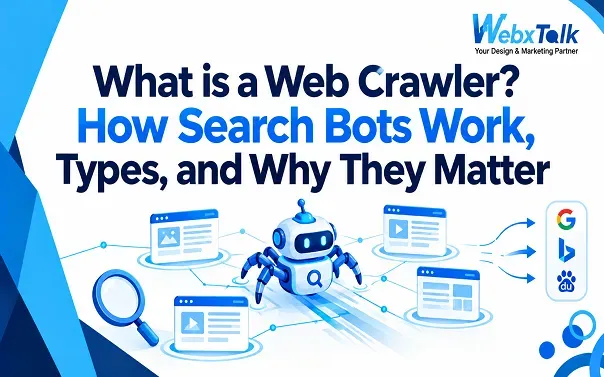
What is a Web Crawler? How Search Bots Work, Types, and Why They Matter
Every time you search for something on Google, the results come from billions of web pages that have already been discovered, processed, and stored by search engines. But how does Google find those pages in the first place?
That is where web crawlers come in.
A web crawler is an automated program that visits web pages, follows links, and collects information about what it finds. Search engines use crawlers to discover new pages and changes to existing ones. Other crawlers are used for SEO audits, research, content analysis, security, and AI systems.
Understanding how web crawlers work can help you identify why some pages are discovered quickly while others struggle to get crawled or indexed.
What Is a Web Crawler?
A web crawler is an automated software program that visits websites and collects information from their pages. It starts with a set of known URLs, visits those pages, finds links on them, and can then follow those links to discover more URLs.
Web crawlers are also called search bots, spiders, spider bots, or web robots. The names are different, but the basic idea is similar: software automatically moves through the web and gathers information.
For example, imagine publishing a new blog post. Google may not know about that URL immediately. Once Google discovers the page through links, a sitemap, or other signals, Googlebot can request the page and examine its content.
A crawler does not automatically mean that a page will appear in search results. Crawling and indexing are different steps. Crawling means the page has been accessed and processed. Indexing is the process of deciding whether and how that page should be stored and made available for search.
This distinction is important because a page can be crawlable but still not appear in Google Search.
How Does a Web Crawler Work?
A web crawler generally follows a simple process:
Discover URLs → Visit pages → Read and process content → Follow links → Store or pass on information
Crawlers need URLs to begin with. These may come from previously discovered pages, XML sitemaps, internal links, external links, or other sources.
Once a crawler selects a URL, it sends a request to the server and retrieves the page. It can then examine elements such as the text, links, images, metadata, and other resources.
If the page contains links to other URLs, those links can provide more places for the crawler to visit.
A website’s technical setup can affect this process. Broken links, server errors, blocked resources, poor internal linking, and other problems can make it harder for crawlers to access important pages.
How Does Google’s Web Crawler Work?
Google uses several crawlers, with Googlebot being the main crawler associated with Google Search.
Googlebot discovers URLs and crawls pages according to Google’s systems and available resources. Before crawling a site, Google’s automated crawlers can check the site’s robots.txt file to understand which areas are allowed or disallowed for crawling.
Google can discover URLs in several ways. Internal links are one of the most important because they help Google move from one page to another. XML sitemaps can also help communicate the URLs that a site considers important.
After fetching a page, Google may process its content and resources before deciding whether the page should be indexed.
This is why simply publishing a page is not enough. The page needs to be accessible, discoverable, and technically suitable for search engines to process.
How Does Google Crawler See My Site?
Google does not always see a website exactly as a person sees it at first glance.
For pages that depend heavily on JavaScript, Google may need to render the page to understand what is displayed and how the page works. Resources such as JavaScript and CSS can therefore matter when Google processes a page.
Crawl resources also aren’t unlimited. Google has systems for managing how much and how often it crawls websites. This is commonly discussed as crawl budget, especially for large websites.
For a small business website with a few dozen or a few hundred useful pages, crawl budget usually isn’t something to obsess over. More important issues are making sure important pages are linked properly, aren’t accidentally blocked, and can be accessed without major technical problems.
Your robots.txt file can control which paths crawlers are allowed to access. However, it should not be treated as a general replacement for noindex when the goal is to keep a page out of Google’s index. Google specifically notes that a URL blocked from crawling may still potentially be indexed without its content being crawled.
What Are the Different Types of Web Crawlers?
Not every crawler has the same purpose. Some exist to build search indexes, while others collect information for SEO tools, AI systems, research, or other services.
Search Engine Crawlers
Search engines use crawlers to discover and process pages across the web.
Examples include:
- Googlebot for Google
- Bingbot for Bing
- Other crawlers operated by different search platforms
These crawlers are closely connected to search engines and their indexing systems.
For website owners, search engine crawlers are especially important because their access can affect whether search engines discover and process your pages.
AI Web Crawlers
AI companies also operate crawlers and fetchers for different purposes. Depending on the system, these may be used to collect web content for training, research, search, retrieval, or answering user questions.
Examples associated with AI companies include crawlers such as GPTBot and ClaudeBot.
AI crawling has become a bigger concern for publishers because website owners may want their content available to traditional search engines but not necessarily available for every AI-related use.
That has made crawler management more complicated than simply asking, “Should I allow bots?”
Website owners may need to decide which crawlers they want to allow, which ones they want to restrict, and why.
Dark Web Crawlers
Dark web crawlers are designed to discover and collect information from websites and services that are not part of the ordinary, easily accessible web.
They work differently from standard search engine crawlers because dark web services may use special networks, access controls, and technical structures that aren’t found on normal websites.
This type of crawling is also associated with security research and monitoring. It is a much narrower area than the crawling performed by Google or commercial SEO tools.
Commercial & SEO Crawlers
SEO platforms use their own crawlers to analyze websites.
Tools such as Ahrefs, Semrush, and Screaming Frog can crawl a site to identify issues such as:
- Broken links
- Missing or duplicate title tags
- Missing meta descriptions
- Redirect problems
- Duplicate pages
- Canonical issues
- Internal linking problems
- Crawlable URLs
- Technical SEO issues
These crawlers are different from Googlebot because their goal isn’t to build Google’s search index. Instead, they provide information that SEO professionals can use to understand and improve a website.
For example, an SEO team may crawl a website before a technical SEO project to identify problems that could affect usability, crawling, or search performance.
Is a Web Crawler the Same as a Search Engine?
No.
A web crawler is a component that helps a search engine discover and process web pages. It is not the entire search engine.
Think of it this way:
Crawler → discovers and fetches pages
Search engine → processes, organizes, indexes, and ranks information
When you search Google, the results you see aren’t simply a list of pages that Googlebot recently visited. Google’s broader search systems evaluate information and determine which results are most useful for a particular query.
So, a crawler is one part of a much larger search system. To see how crawling connects with indexing, ranking, and everything else that affects visibility, start with our SEO basics guide.
What Is the Main Purpose of a Web Crawler? What Are the Benefits?
The main purpose of a web crawler is to automatically discover and collect information from web pages.
For search engines, crawling helps keep their understanding of the web up to date. If a company publishes a new service page, for example, a crawler needs to discover that page before the search engine can properly process it.
For website owners, crawlers can provide several practical benefits.
- New pages can be discovered
Crawlers help search engines find new URLs that weren’t previously known.
- Updated content can be revisited
When an existing page changes, crawlers can return to it and process the updated version.
- Website problems can be identified
SEO crawlers can uncover technical problems that aren’t always obvious when browsing a website manually.
- Search engines can understand website relationships
Internal links help crawlers move between related pages. A well-organized website therefore gives both users and crawlers clearer paths through the site.
- SEO audits become easier
Instead of manually checking hundreds or thousands of URLs, an SEO crawler can inspect a large website and report potential issues.
For example, an agency such as Webxtalk can use website crawling as part of an SEO audit to identify technical issues, internal linking problems, and pages that may need improvement before working on broader search visibility.
The important point is that crawling itself doesn’t guarantee rankings. It simply helps search engines and SEO tools access and understand what is available.
Web Crawling vs. Web Scraping — And Do Hackers Use It?
Web crawling and web scraping are related, but they aren’t exactly the same thing.
Web crawling is mainly about discovering and visiting URLs. A crawler may move from one page to another by following links and collecting information about those pages.
Web scraping focuses more specifically on extracting particular information from web pages.
For example, a crawler might visit 10,000 product pages to discover what URLs exist. A scraper might collect the product names, prices, ratings, or other specific data from those pages.
The two processes can overlap, but their purpose is different.
Do hackers use web crawlers?
Yes, automated crawling and scanning can also be used for malicious purposes.
Attackers may use automated tools to look for exposed files, vulnerable software, login pages, outdated systems, or other weaknesses across websites.
That doesn’t mean every crawler is suspicious. Search engines, SEO platforms, researchers, security teams, and businesses all use automated crawling for legitimate purposes.
The important distinction is what the crawler is doing, who operates it, what it accesses, and how it behaves.
If a bot sends an excessive number of requests or attempts to access sensitive areas, it can put unnecessary load on a server or create a security risk.
Are Web Crawlers Legal?
Generally, using a web crawler is not automatically illegal. The legal position depends on factors such as what information is being collected, how it is collected, where it is collected from, and what happens to the data afterward.
For example, crawling publicly available information for legitimate research is very different from attempting to bypass authentication and collect private information.
Website owners can also publish rules about crawler access through mechanisms such as robots.txt. Google supports the Robots Exclusion Protocol and uses robots.txt rules to determine which parts of a site its automated crawlers may access.
However, robots.txt is not a security system. It tells compliant crawlers what they should or shouldn’t crawl. It does not protect private information from someone deliberately trying to access it.
If sensitive information needs to be protected, proper access controls and authentication should be used.
For businesses, it is also worth considering the terms of service, copyright rules, privacy requirements, and applicable laws before collecting large amounts of information from other websites.
Why Block AI Crawlers?
Some website owners choose to restrict AI crawlers because they have concerns about how their content may be used.
For example, a publisher may be comfortable with Google crawling an article for traditional search but may not want a particular AI crawler accessing the same content.
Common reasons for restricting AI crawlers include:
- Concern about AI training
- Protecting original content
- Reducing unwanted server requests
- Controlling how content is reused
- Protecting subscription or premium content
- Exploring pay-per-crawl or licensing models
One way website owners can communicate crawling preferences is through robots.txt. Google documents how crawler-specific rules can be created using User-agent, Allow, and Disallow directives.
However, blocking a crawler should be a deliberate decision.
For example, completely blocking bots without understanding what they do could have unintended consequences. A site owner should first identify the crawler, understand its purpose, and decide whether restricting it actually supports the site’s goals.
It is also important to separate crawler access from indexing. Blocking a URL in robots.txt doesn’t necessarily mean the URL can never appear in search. Google explains that a blocked URL may still be indexed if it is discovered through other means.
What Is the Best Free Website Crawler Tool Available Online?
There isn’t one crawler that is best for every website. The right tool depends on what you are trying to investigate.
Screaming Frog SEO Spider is one of the better-known options for website crawling and technical SEO audits. Its free version can be useful for smaller websites, while larger sites may require the paid version.
Other SEO platforms, including Ahrefs and Semrush, also provide website crawling features as part of their broader SEO toolsets.
A simple crawler can help you answer questions such as:
- Which pages return errors?
- Are there broken internal links?
- Are important pages missing from internal navigation?
- Which pages have missing titles or descriptions?
- Are redirects working correctly?
- Are there duplicate or unnecessary URLs?
For a small website, you don’t necessarily need a complicated crawling setup. Start with the issues that affect important pages and fix those first.
FAQs
Is web crawling free?
It can be. Some public crawlers and SEO tools offer free crawling options, although they may limit the number of URLs or features available. Larger websites and advanced crawling projects may require paid tools or infrastructure.
Does every website get crawled?
No. A website isn’t guaranteed to be crawled immediately or frequently. Search engines discover pages based on various signals, and technical problems, poor discoverability, or crawling restrictions can affect access.
How do I stop a web crawler from accessing my website?
For compliant crawlers, robots.txt can be used to communicate which parts of a site should not be crawled. However, it is not a security mechanism and should not be used to protect private information.
What is another name for a web crawler?
Web crawlers are also commonly called spiders, bots, spider bots, search bots, or web robots.
Does crawling mean my page is indexed?
No. Crawling means a search engine has accessed or processed a URL. Indexing is a separate step. A crawled page may still not be included in search results.
Can I see Googlebot crawling my website?
You can monitor search-related crawling activity through tools such as Google Search Console and server logs. These can help you understand whether Google is accessing your site and whether technical problems may be affecting crawling.
Final Thoughts
Web crawlers are one of the basic systems that keep search engines and many online tools connected to the web. They discover pages, follow links, collect information, and help systems understand what is available online.
For website owners, the goal isn’t to make every crawler happy. It is to make sure important pages are accessible to the crawlers that matter to your business while controlling access where there is a legitimate reason to do so.
A crawlable website is only the starting point. Strong internal linking, useful content, sound technical setup, and a clear site structure all help search engines make better sense of the website.



 Yes, I Want Growth