
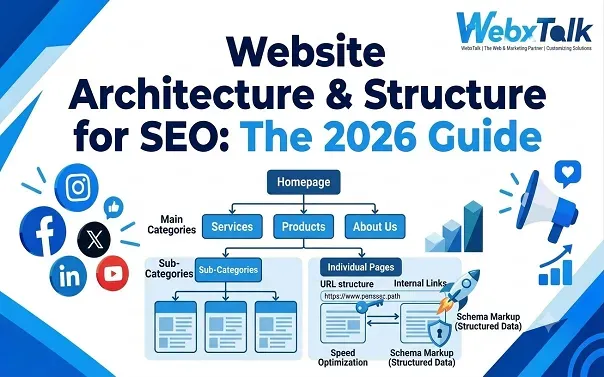
Website Architecture for SEO: How to Structure Your Site (2026 Guide)
Even if a website has useful content, good service pages, and good products, it still may not achieve high rankings because of the poor organization of its pages. It could be hard for visitors to navigate, and for search engines to understand the relationship between different pages. One solution to these issues is website architecture, which is able to provide a site with a clear structure.
The aim of SEO is not to make a site complex or add many pages. It is to structure or arrange information to enable people to locate what they require without needless clicks. A well-structured site also assists search engines in finding the critical addresses, understanding their meaning, and determining which pages are important. This guide details the different types of website architecture and how to create a structure that will help you rank and improve user experience.
What is Website Architecture?
The design of a website can impact the navigation of the website by the user as well as search engines. Clear menus and internal links link together pages of related content, which allows search engines to understand what content is on a page and find the important pages. Visitors benefit too. For instance, someone searching for running shoes should easily be able to locate the running shoes section, not the wetsuits section. Simple and organized structure for ease of use and prevents overlooking important pages on a website.
Common Website Architecture Mistakes to Avoid
Even a website with good content can become difficult to navigate when its structure is not planned properly. Watch out for these common mistakes:
- Creating too many categories: Similar topics spread across several categories can confuse visitors and make content harder to manage.
- Leaving important pages buried: Key service, product, or category pages should not depend on visitors finding them through a long chain of clicks.
- Ignoring internal links: Publishing a page without connecting it to relevant content can leave it isolated.
- Creating duplicate pages: Similar URLs with overlapping content may compete for the same search intent and waste crawling resources.
- Changing URLs without redirects: When an established URL changes, a suitable redirect can help users and search engines reach the new location.
- Relying only on the sitemap: A sitemap helps with URL discovery, but it does not replace a logical site structure or internal links.
- Overcomplicating navigation: Too many menu items, dropdowns, and filters can make it harder for visitors to find what they need.
The practical approach is to keep the structure understandable, connect related pages, and review it whenever the website changes significantly.
What Are the Basic SEO Principles?
SEO involves helping search engines understand a website and making its pages useful to people searching for relevant information. Several principles apply regardless of the website’s size or industry.
Match Search Intent: Understand what people expect to find when they search. A definition page needs a clear explanation, while a software comparison should cover features, pricing, and alternatives.
Create Valuable Content: Give readers accurate answers and practical information they can use. Longer content is not automatically better if it adds nothing useful.
Keep the Website Technically Accessible: Make sure search engines can reach and understand key pages. Review indexing, mobile usability, page speed, canonical tags, and redirects.
Connect Related Pages: Use internal links to guide visitors toward relevant information. These links also help search engines find pages and understand how topics relate.
Establish Trust: Support claims with reliable information and demonstrate relevant experience. Earn links from credible, relevant websites instead of relying on manipulative tactics.
Track Meaningful Results: Look beyond keyword rankings. Organic traffic, qualified leads, sales, and engagement provide a clearer picture of whether SEO is helping the business.
Good SEO is a combination of useful content, accessible technology, clear organization, and ongoing improvement. Website architecture supports these principles by making information easier to discover and navigate.
What Are the Four Types of SEO?
There are four main components that cover different factors that can impact a website’s ranking in search results. Knowing about their interactions helps you to determine where to invest your efforts.
On-Page SEO
This covers the content and elements people see on individual pages. Page titles, headings, meta descriptions, images, and internal links help search engines understand each page and how well it matches a query.
Off-Page SEO
Off-page SEO builds a website’s reputation beyond its own pages. Earning links from relevant websites, gaining brand mentions, and securing digital PR coverage can strengthen credibility and support search visibility.
Technical SEO
A website needs a sound technical foundation for search engines to access and process its pages. Technical SEO addresses crawling, indexing, page speed, redirects, canonical tags, and structured data. It also supports a well-organized site structure.
Local SEO
Local SEO connects businesses with people searching for products or services in a specific area. Key activities include maintaining a Google Business Profile, managing customer reviews, keeping business details accurate, and creating useful location-based content.
The right balance depends on the business. A plumber serving one city may focus heavily on local SEO, while a national online store may need more attention on technical improvements, product pages, and backlinks. For businesses unsure where to start, Webxtalk offers SEO services that can be tailored to their website, audience, and growth goals, helping prioritize the areas most relevant to their needs.
What Is the Best Strategy for SEO?
The best SEO strategy depends on your business and what you want to achieve. Start by checking how your website performs, which pages need improvement, and whether any technical issues are stopping search engines from finding your content.
Next, focus on what matters most. A local business may need better service pages and local visibility, while an online store may benefit more from improving product pages, categories, and internal links. There is no need to create dozens of blog posts if more important pages need attention.
Finally, track results that matter, such as qualified traffic, leads, and sales. Keep improving your website based on what the data shows instead of chasing every new SEO trend.
What Are the 5 Best SEO Tools?
The right SEO tools depend on the task, budget, and website size. These five options cover common SEO needs.
- Google Search Console: Shows search impressions, clicks, queries, indexing information, and certain technical issues. It is a useful starting point for understanding how Google sees a website.
- Google Analytics 4: Helps measure website activity, traffic sources, conversions, and user journeys. It is particularly useful for connecting organic visits with business outcomes.
- Screaming Frog SEO Spider: Crawls websites to identify broken links, redirect chains, missing metadata, duplicate content signals, and other structural issues. Its free version has a crawl limit.
- Ahrefs: Offers backlink analysis, keyword research, competitor research, and site auditing. Paid access may be necessary for more extensive research.
- Semrush: Provides keyword research, competitor analysis, rank tracking, backlink data, and site auditing. It can help teams manage several parts of an SEO workflow in one platform.
You do not need every tool immediately. Google Search Console and Analytics are a practical starting point, while a crawler and a paid research platform become more useful as the site’s needs grow.
What Makes a Good Website Good?
A good website guides people to the information they need, explains what they can do and gets them to do it. Visual design is important, but it’s not all that’s important. A well-organized website has good navigation, readable text, page titles, working links and layout that are mobile-friendly. Visitors should know what a business provides without relying on other pages that do not pertain to the business.
Performance matters, too. Frequent problems include slow pages, intrusive pop-ups, broken forms, and confusing checkout processes, which all frustrate users. Actions of importance, like booking a service or contacting a company, should be easy actions to complete. Important pages should be accessible to search engines, have relevant inbound links and be useful for the inbound search queries they are targeted. As the website grows, routine care ensures its reliability.
Website Architecture Checklist
Use this checklist when planning a new website or reviewing an existing one.
- Main categories reflect the website’s purpose and audience.
- Important pages are accessible through clear navigation and internal links.
- The hierarchy is logical and does not contain unnecessary levels.
- URLs are readable and follow consistent patterns.
- Related pages are grouped into meaningful topic clusters.
- Internal links use descriptive, relevant anchor text.
- Breadcrumbs are used where they improve navigation.
- XML sitemaps include appropriate canonical URLs.
- Broken links, redirect chains, and orphan pages are checked regularly.
- Duplicate or low-value URLs are managed appropriately.
- Mobile navigation and important user journeys work correctly.
- Search Console and analytics data are reviewed to identify problems.
A checklist is useful, but the priority is to fix issues that prevent people from finding important information or completing valuable actions.
Final Thoughts
Website architecture is not just about deciding where pages belong. It determines how people move through a website, how related information connects, and how easily search engines can discover important content.
Start with a clear hierarchy, use consistent URLs, connect related pages, and make navigation simple. Then review the structure as the website grows. There is no need to make every section complicated or create a separate page for every keyword.
The most effective architecture is the one that helps visitors find what they need while supporting the website’s business goals. When the structure is clear and the content is genuinely useful, SEO becomes easier to manage and improve over time.
Frequently Asked Questions
What is the ideal website architecture for SEO?
Most websites benefit from a clear hierarchy that groups related pages together. The structure should make sense for both visitors and search engines, whether the site has ten pages or thousands.
How many clicks should it take to reach an important page?
Important pages should be easy to find without digging through several layers of navigation. There is no strict click limit, but shorter paths and useful internal links generally make navigation easier.
Does website architecture directly affect rankings?
It can affect how search engines discover pages, understand site relationships, and follow internal links. However, rankings also depend on content quality, relevance, competition, and other SEO factors.
What is the difference between website architecture and website design?
Think of architecture as the site’s layout plan: it determines how pages are grouped and connected. Design focuses on how those pages look and how people interact with them. A site needs both to work well.
Is a sitemap enough to help Google find every page?
Not on its own. An XML sitemap lists important URLs for search engines, but it does not guarantee that they will be crawled or indexed. Internal links and a technically accessible website are still essential.
How often should website architecture be audited?
Check the structure whenever the site undergoes a redesign, migration, or major content update. For larger websites, regular audits can also catch broken links, orphan pages, and navigation issues before they become bigger problems.





 Yes, I Want Growth