Top 12 Social Media Marketing Companies in Austin (2026)
Social media can help Austin businesses get noticed, connect with potential customers, and build a recognizable brand. But posting a few updates each week does
Learn what digital marketing is, how every major channel and service works, and how to move from the basics to advanced strategy, automation, and AI search.
Written by Amit Mishra, CEO & Digital Marketing Expert
Last Updated October 13, 2026

Get an SEO strategy that’s tailored for your business, industry, and revenue goals.
Digital marketing is the practice of promoting a business through online channels such as search engines, websites, social media, paid ads, email, video and AI assistants. It helps you reach people where they already spend their time, track every result, and spend your budget on what works. Part 1 of this guide covers the basics of each core channel. Part 2 goes deeper into every service, advanced tactics, and how to build a full strategy.
In this guide, you will learn about:
How to Get Started with Digital Marketing
Frequently Asked Questions
Part 1 covers the eight core channels every beginner should understand before spending money on any of them.
In Chapter 1, you will learn the fundamentals of digital marketing.
Or, skip ahead to the next chapter on SEO basics!
Digital marketing is the promotion of products or services through online channels, including search engines, websites, social media, email, paid ads, and AI assistants. Unlike a billboard or a newspaper ad, every click, call and sale can be measured. Most businesses start seeing early signals within weeks from paid channels, while organic channels like SEO and content usually need 3 to 6 months of steady work.
Digital marketing works by meeting people at each stage of their buying journey and moving them one step closer to becoming a customer. Think of it like a shop on a busy street. First, people have to notice the shop, then walk in, then trust it enough to buy, and finally come back.
Most marketers break this journey into four stages:
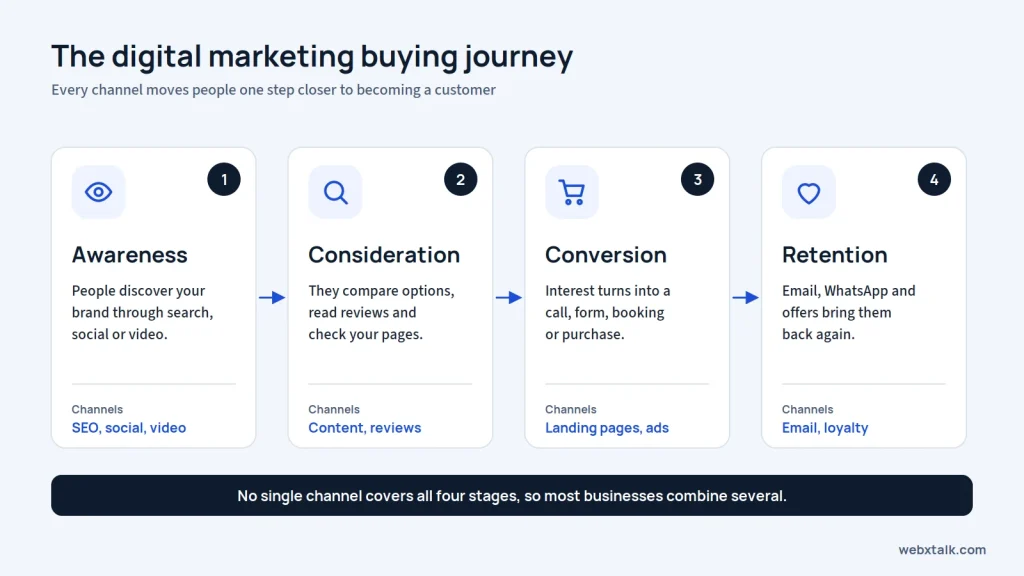
This is where consumers first find out about your brand. They may find your page in the results when they are looking for a solution to a problem, a video on YouTube, or a social media post. They’re not ready to purchase at this time, but they are aware of your brand.
Now the person is comparing options by reading blog posts, checking reviews, looking at your service pages, and visiting competitor sites.
This is where interest turns into action: a form submission, a phone call, a booking or a purchase. Landing pages, retargeting ads and a fast, easy website decide how many visitors actually convert.
The sale is not the end. Email newsletters, WhatsApp updates, loyalty offers and social media keep customers coming back and referring others. Keeping an existing customer usually costs far less than winning a new one.
No single channel covers all four stages well. That is why most businesses combine several channels into one plan instead of betting everything on one.
Digital marketing channels generally fall into three buckets, often called owned, earned and paid media:
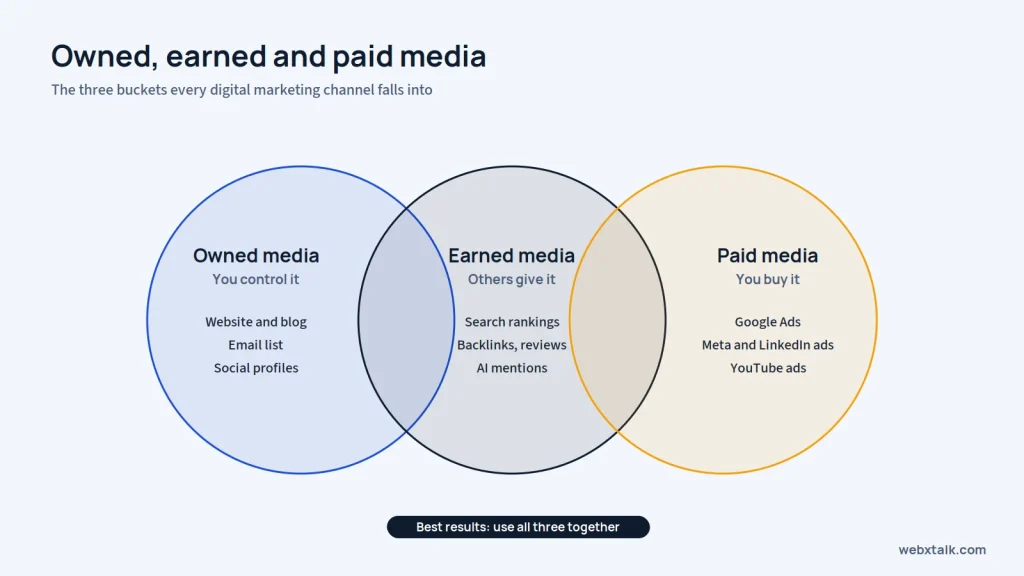
You can check breakdown of the core channels covered in this guide:
Digital marketing is important because that is where your customers are. A report shows that 6 billion people are now online, and some 5.66 billion social media user identities are active globally, accounting for 68.7% of the world’s population (We Are Social / DataReportal, Digital 2026).
Here are the major reasons businesses invest in it:
A small business in Delhi or Dallas can reach customers across the city, the country or the world without opening a new office. You decide the geography, from a 5 km radius to the whole of the USA.
Digital channels let you choose exactly who sees your message by location, age, interests, job title, device or past behavior on your website. Print and TV can’t come close to this level of control.
Every click, lead and sale can be tracked. You always know which channel brought in the customer and what it cost, so budget decisions are based on data instead of gut feeling.
You can start with a small budget, test what works, and scale only the winners. A paid campaign can be paused in seconds if it is not performing.
Businesses of every type, from B2B manufacturers to B2C retail brands, use digital marketing to bring in visitors, generate leads and grow sales. If you run a smaller company, our page on digital marketing for small businesses explains where to start.
In short, digital marketing matters because it puts your business in front of the right people, at the right moment, with results you can measure.
Chapter 2 covers search engine optimization, the channel that brings in free, long-term traffic.
Or, skip ahead to the next chapter on content marketing basics!
Search engine optimization (SEO) is the process of improving your website so it ranks higher in unpaid Google and Bing results. Whether your page appears on page one or page five depends on SEO when someone has a search for “interior designer near me” or “best CRM for startups.
SEO has three main parts:
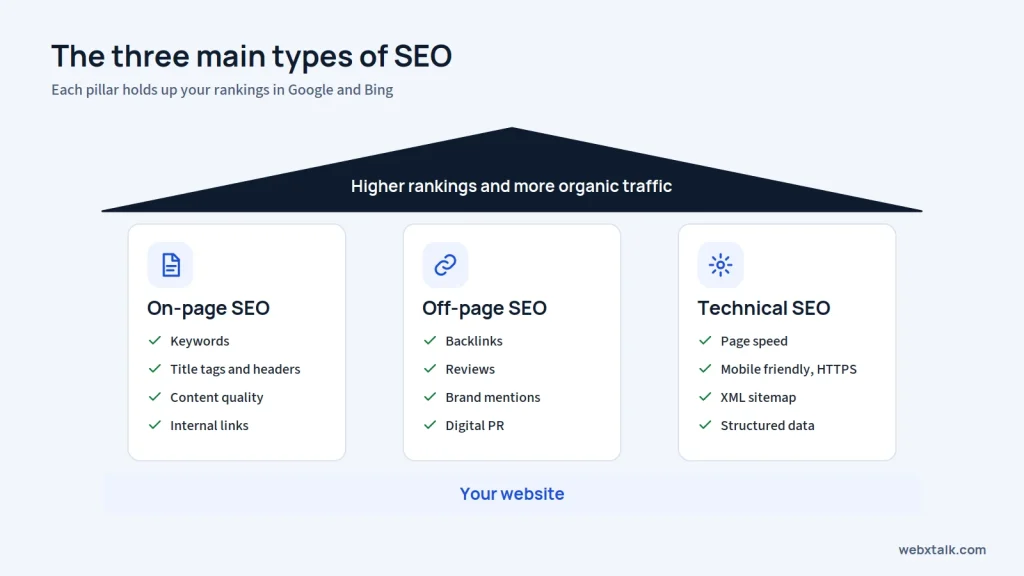
SEO matters because search is where people go when they have a problem to solve or something to buy. It helps your business:
SEO also supports almost every other channel. Your blog posts, landing pages and even your visibility in AI tools all depend on a site that search engines can crawl, understand and trust.
Here is a simple starting point. Each step is covered in full detail in our SEO basics guide.
Discover the keywords used by your customers in Google. Utilize a tool such as Google Keyword Planner, Ahrefs, or Semrush and target keywords that have actual search volume and reasonable competition. Our guide on keyword research provides you with every step to keyword research in detail.
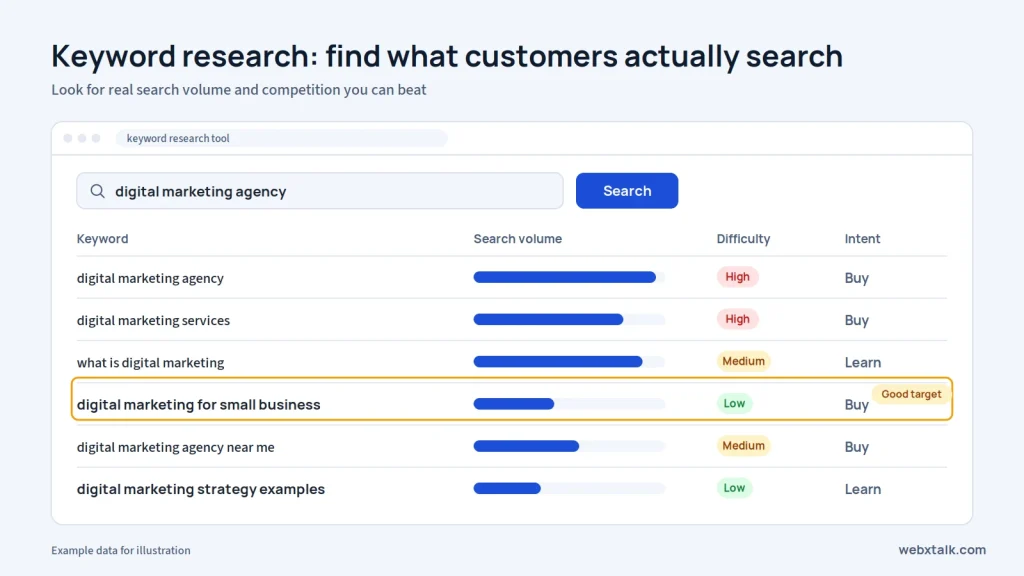
Place your target keyword in the title tag, H1, first paragraph, and URL. Keep title tags under 60 characters and meta descriptions under 155. Learn more in our on-page SEO guide.
Earn backlinks from relevant, trusted websites through useful content, digital PR and outreach. Quality matters far more than quantity. Read our off-page SEO guide for practical methods.
Make sure your site loads fast, works well on mobile, uses HTTPS and has an XML sitemap submitted to Google Search Console. Our technical SEO guide covers the full checklist.
If you serve customers in a specific city, claim your Google Business Profile, keep your name, address and phone number consistent, and collect reviews. See our local SEO guide for details.
SEO is a long game. Most websites need 3 to 6 months of consistent effort before rankings move in a meaningful way, which is why many businesses run paid ads alongside SEO in the early months.
In Chapter 3, you will learn how content attracts, educates and converts your audience.
Or, skip ahead to the next chapter on social media marketing basics!
Content marketing is the creation and sharing of valuable content that draws your audience to you and establishes trust prior to the purchase. Rather than trying to push a sales pitch, you’re assisting them with a problem and they’ll keep you in mind when they’re ready to buy.
Common types of content include:
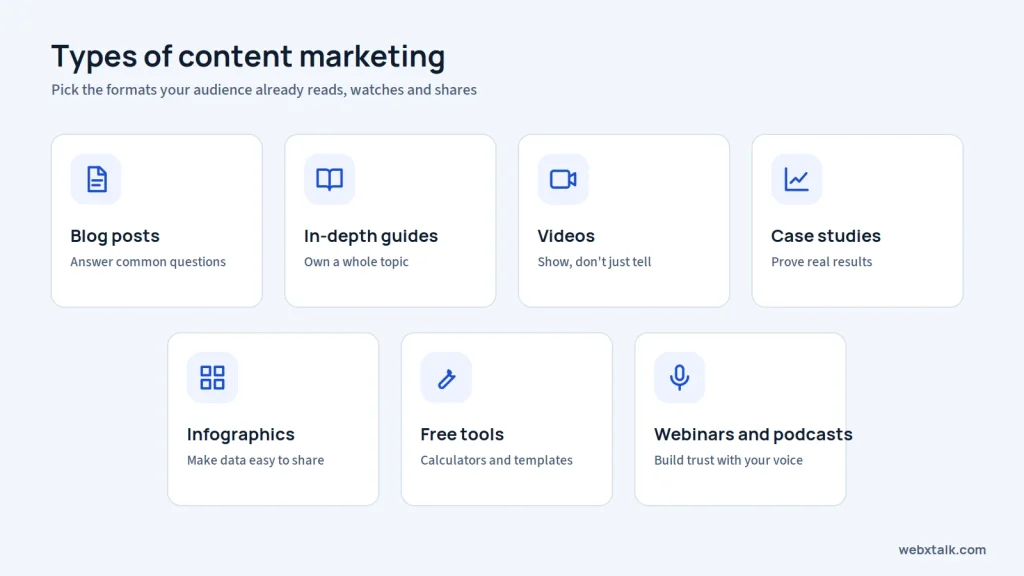
Content is the fuel that runs almost every other channel. Your SEO needs pages to rank, your social media needs posts to share, your email list needs something worth opening, and AI tools need clear answers to quote.
Good content helps you:
Weak content does the opposite. If a page doesn’t answer the reader’s question, they leave, and search engines notice.
To create content that both people and search engines value, focus on these steps:
Talk to your sales and support teams. List the questions customers ask before buying, the objections they raise, and the words they use. This list becomes your content plan.
Check the search volume for each topic in a keyword tool and look at what already ranks. Choose topics where you can say something more useful, more current or more specific than the existing pages.
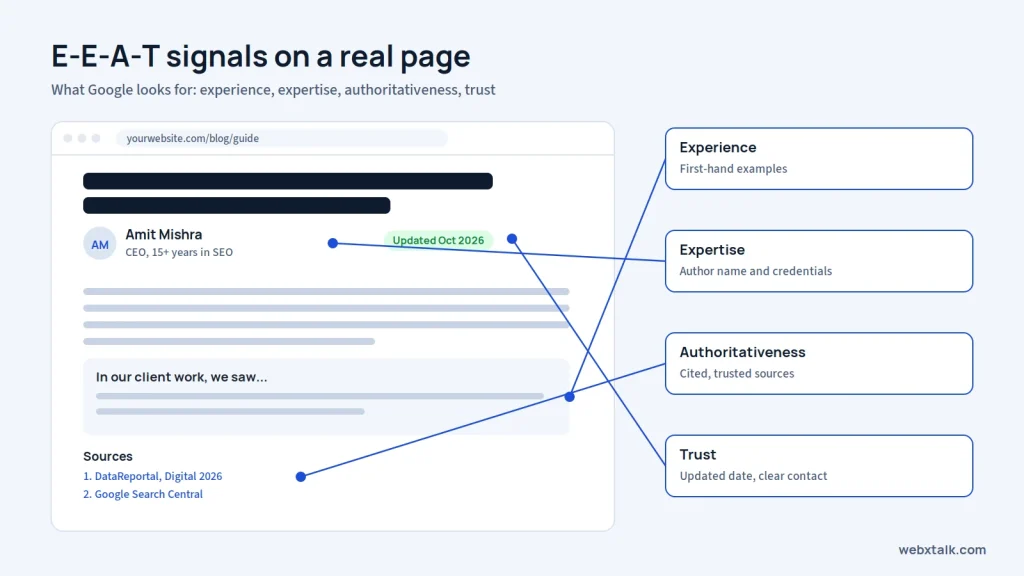
Google looks for experience, expertise, authoritativeness and trust. Add author names and credentials, share first-hand examples, include real numbers, and cite reliable sources.
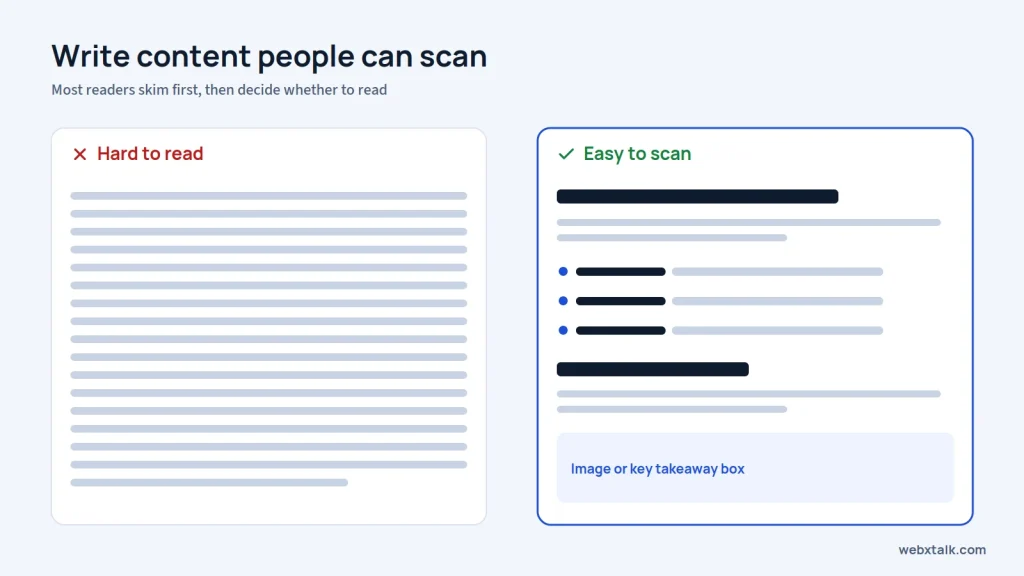
Use clear headers, short paragraphs of two or three lines, bullet points and bold text for key ideas. Most readers scan before they read, so help them find what they need quickly.
One good guide can become five social posts, a short video, an email newsletter and a carousel. Publishing is only half the work. Share every piece on the channels where your audience spends time.
Old statistics and outdated advice hurt trust. Review your top pages every 6 to 12 months and refresh the facts, examples and dates.
Chapter 4 explains how to build a brand and a community on social platforms.
Or, skip ahead to the next chapter on paid advertising basics!
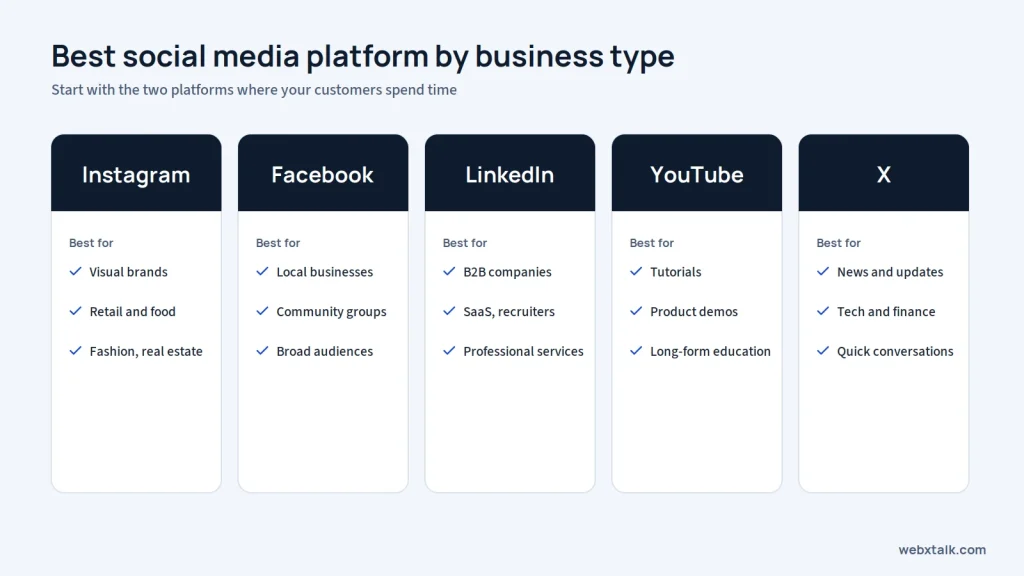
Social media marketing involves using social media platforms such as Facebook, Instagram, LinkedIn, YouTube, and X to create brand awareness, connect with your audience, and generate traffic or sales. It comprises two types: organic posting (free) and paid social ads (which we will discuss in Chapter 5).
Each platform suits a different goal:
Social media is where most people spend a large share of their online time. It matters because it:
People also use social platforms to research brands. A business with an active, helpful profile often looks more trustworthy than one with a page that hasn’t posted in a year.
Here’s how to start without spreading yourself too thin.
Start small. Focus on the two platforms your customers use most, then expand when you can manage them well.
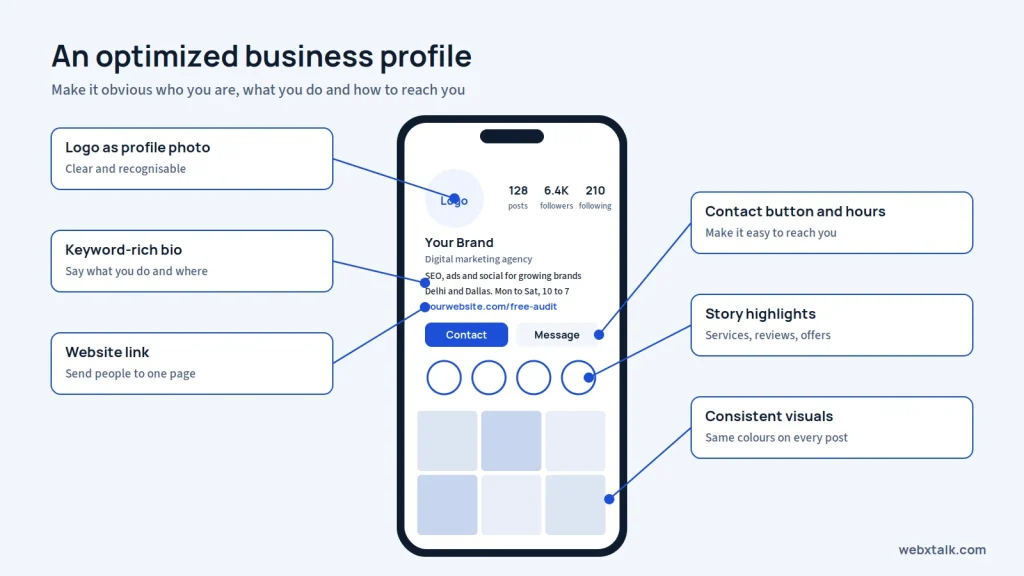
Make it easy for people to recognize and contact your business. Add your logo, website, contact details and business hours. Keep your name and branding consistent across platforms.
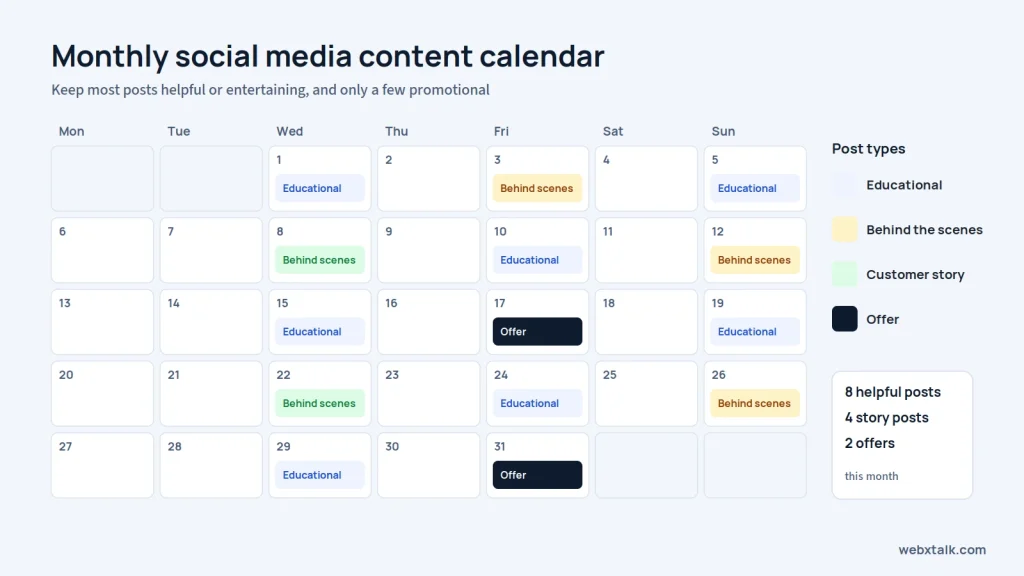
Plan out posts for the week/month. Throw in some tips, customer stories, random business moments, and a few promotions. This ensures that you have a diverse range of content and plan it effectively.
A short video can be a demonstration of your product, answer a frequently asked question, or give a helpful tip. You don’t need to use a computer to get started. Be sure to stick to the message and not elaborate on the production.
Make time for your audience. Answer questions, reply to comments and join conversations related to your business. These small interactions help build trust.
Check your results monthly. Which posts bring clicks, enquiries or genuine engagement? Use that information to improve your next round of content instead of repeating posts that get little response.
In Chapter 5, you will learn how paid ads deliver fast, targeted traffic.
Or, skip ahead to the next chapter on email marketing basics!
Paid advertising, often called pay-per-click (PPC), is a model where you pay a channel so that they will show your ad and grow your online presence. It is usually paid each time someone clicks it. Some of the most common types are:
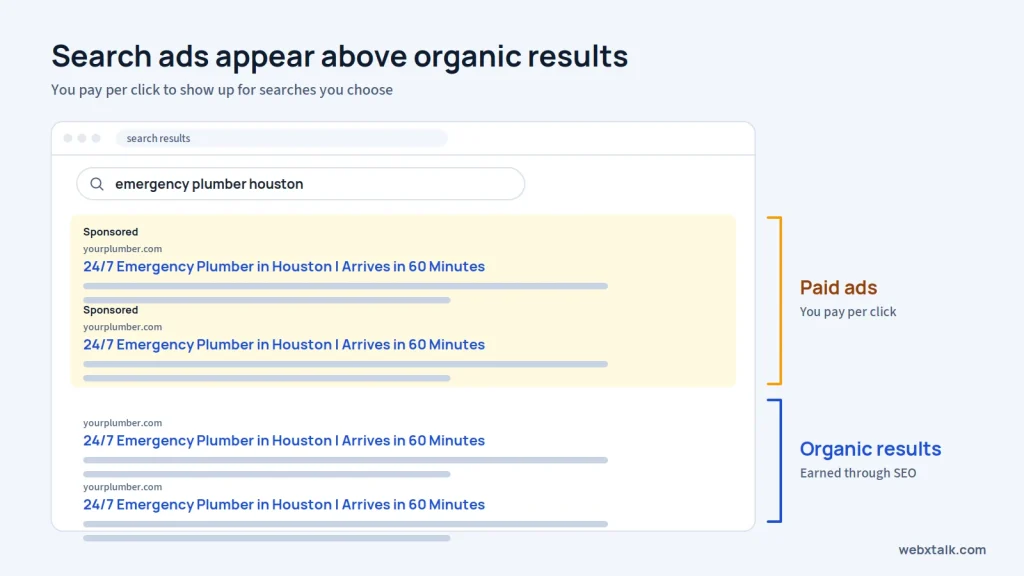
If you are thinking about your brand in one day from SEO and content, that is the wrong practice, as it takes months to build. That’s why paid ads can put you on page one today, which makes them useful for:
The trade-off is simple. Traffic stops the moment you stop paying, so most businesses use ads alongside SEO, not instead of it.
Here’s how to set up campaigns that don’t waste budget.
Before you make your phone calls, fill out a form, or make a booking or sale, you must determine what success is. A single primary objective should be used for each campaign.
Use search ads when people already search for what you sell. Use social ads when you need to create demand or reach people by interest or profession.
For search ads, target high-intent keywords such as “emergency plumber in Houston” and add negative keywords to block irrelevant searches. For social ads, build audiences from your customer list, website visitors and lookalikes.
Make the benefit clear and tell people what to do next. Test different headlines or messages to find out which gets a better response.
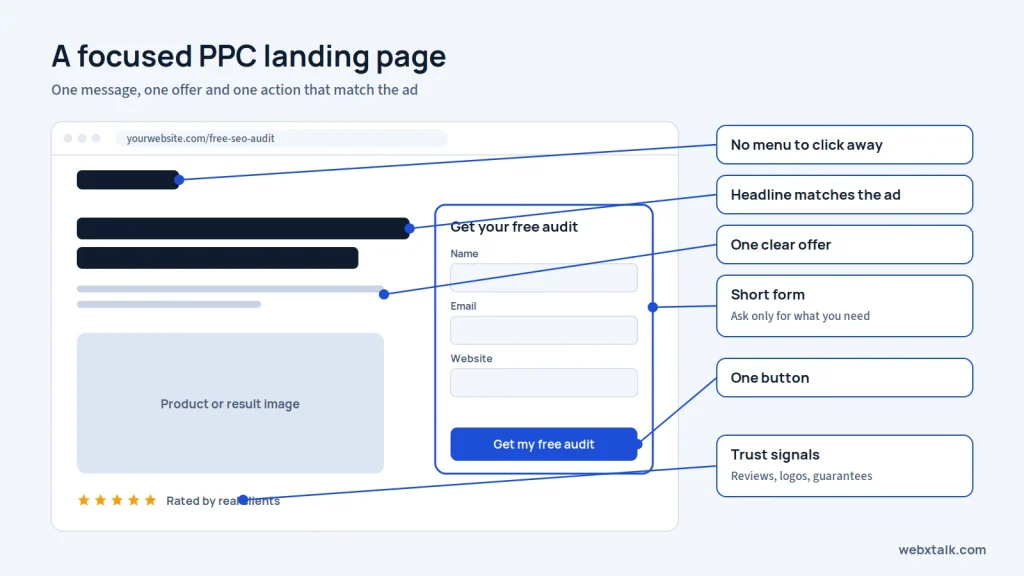
An ad should lead to a page that matches its promise. Keep the information relevant and make it easy for visitors to call, submit a form or buy.
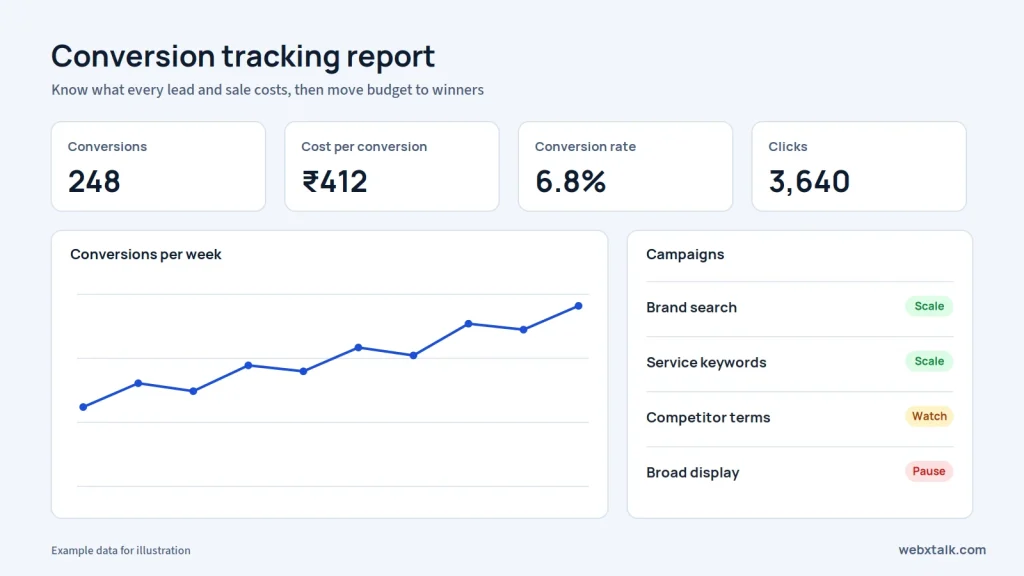
Test which ads convert leads or sales and not clicks. Check performance regularly, and remove ineffective ads and allocate more budget to the ones that are effective.
Chapter 6 shows you how to turn one-time visitors into repeat customers through their inbox.
Or, skip ahead to the next chapter on AI marketing basics!
Email marketing is the practice of sending targeted messages to people who have agreed to hear from you. It includes newsletters, welcome emails, product updates, offers, abandoned cart reminders and follow-ups after a purchase.
The most common types of emails are:
Email is one of the few channels you fully own. Social platforms can change their algorithm and ad costs can rise, but your email list stays yours.
Email marketing helps you:
It can be an effective approach to market your products; that’s why, before sending the email, keep these points in mind so that your message will resonate with the targeted audience.
Collect emails through website forms, free downloads, webinars and checkout pages. Never buy email lists. They hurt deliverability and often break privacy laws.
Tools like Mailchimp, Brevo, HubSpot and Klaviyo let you design emails, manage subscribers and set up automation without coding.
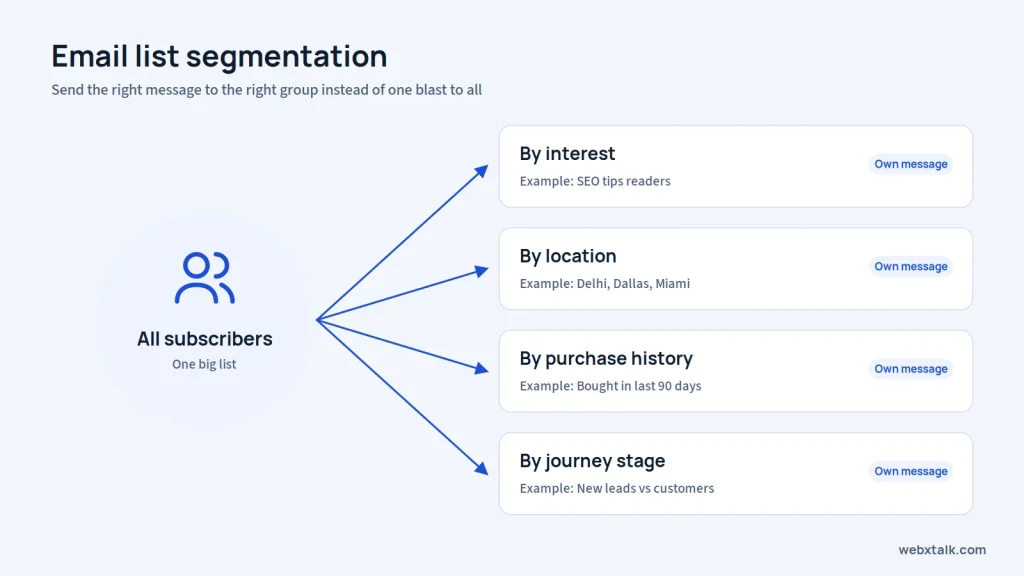
Group subscribers by interest, location, purchase history or stage in the buying journey. A message sent to the right segment performs far better than one blast to everyone.
Keep subject lines short and specific. Tell readers what they will get, avoid spammy words and all caps, and test two versions when you can.
Set up a welcome series, an abandoned cart reminder and a post-purchase follow-up first. These run in the background and keep working every day.
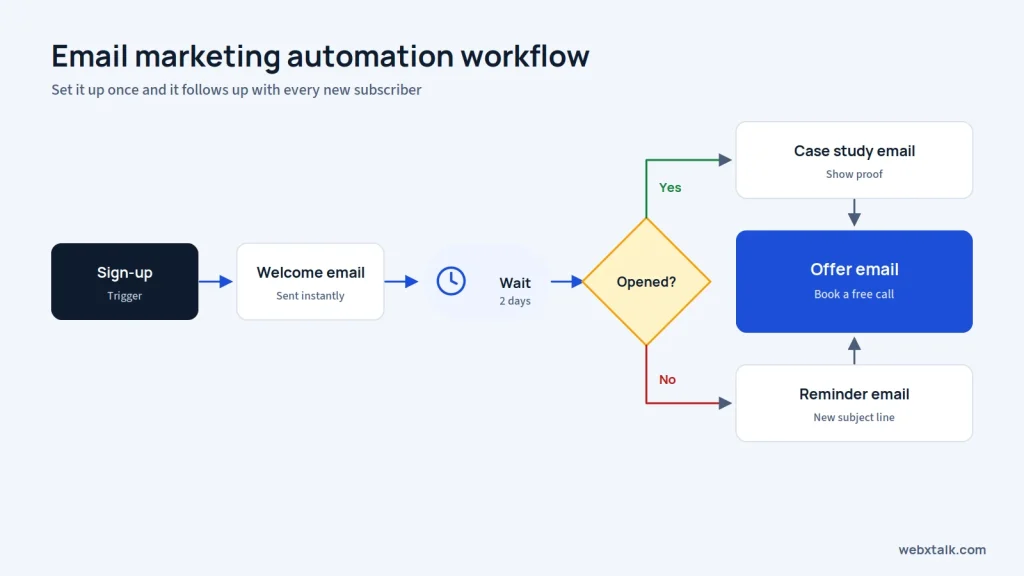
Include an unsubscribe link and your business address in every email, and respect consent laws such as CAN-SPAM in the USA, GDPR in Europe and the DPDP Act in India.
Track open rate, click rate, unsubscribes and, most importantly, conversions. Clean inactive subscribers from your list every few months to protect deliverability.
AI is changing both how people search and how marketers work. Chapter 7 covers both sides.
Or, skip ahead to the next chapter on digital marketing analytics basics!
AI marketing has two meanings, and beginners should understand both:
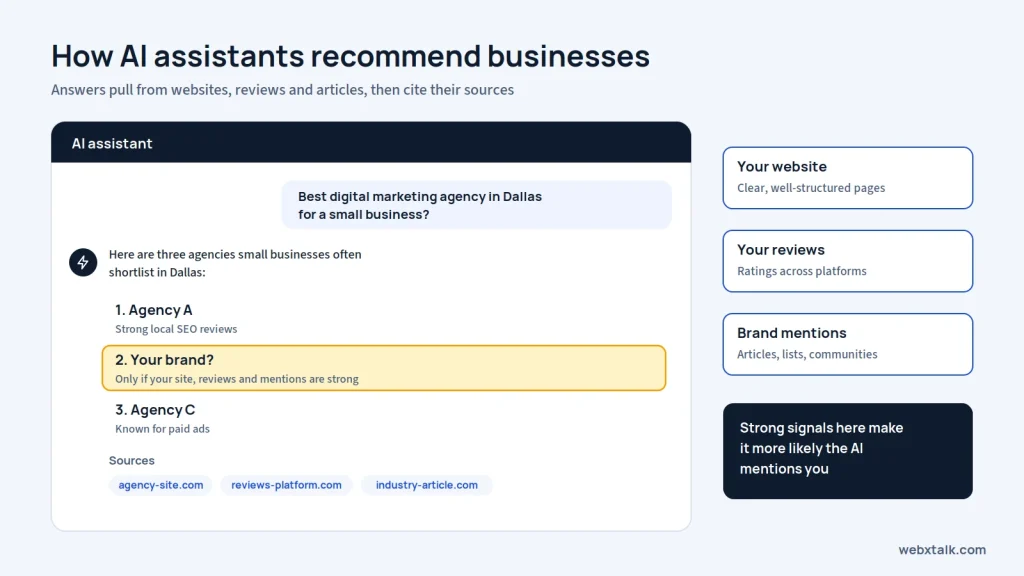
Fewer people are now seeking out the 10 blue links and more people will ask for recommendations from AI tools. As revealed in the Digital 2026 report by DataReportal, more than 1 billion individuals are utilizing AI tools on a monthly basis.
That shift matters for two reasons:
On the productivity side, AI helps small teams do work that once needed a large department, from first drafts to campaign reports.
Here’s where to start.
AI tools rely on websites which are already well optimised and easy to navigate. The basics of AI visibility is strong SEO, fast pages and clear site structure.
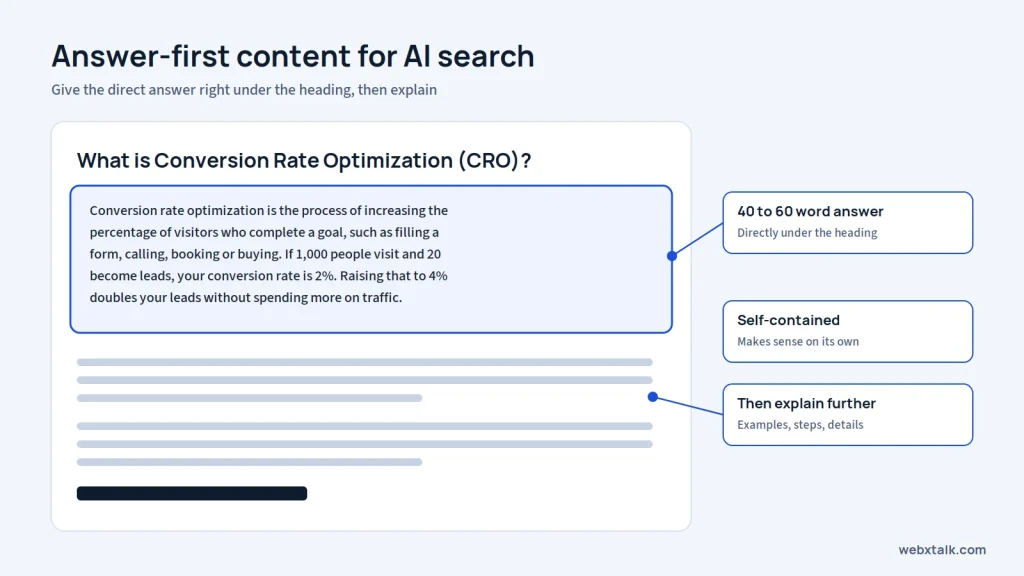
Write a clear and concise answer to the question in the heading (40-60 words) and then provide more detailed explanations for key areas. Provide clear definitions, faq’s and short lists. This is typical of AI engines that stick these self-contained blocks on the end of their answers.
Generic content gets ignored. Include your own data, real examples, case studies, pricing ranges and expert opinions that other sites don’t have.
AI tools learn about brands from many sources, not only your website. Keep listings accurate, earn reviews, get featured in industry articles and take part in genuine discussions on platforms like Reddit and Quora.
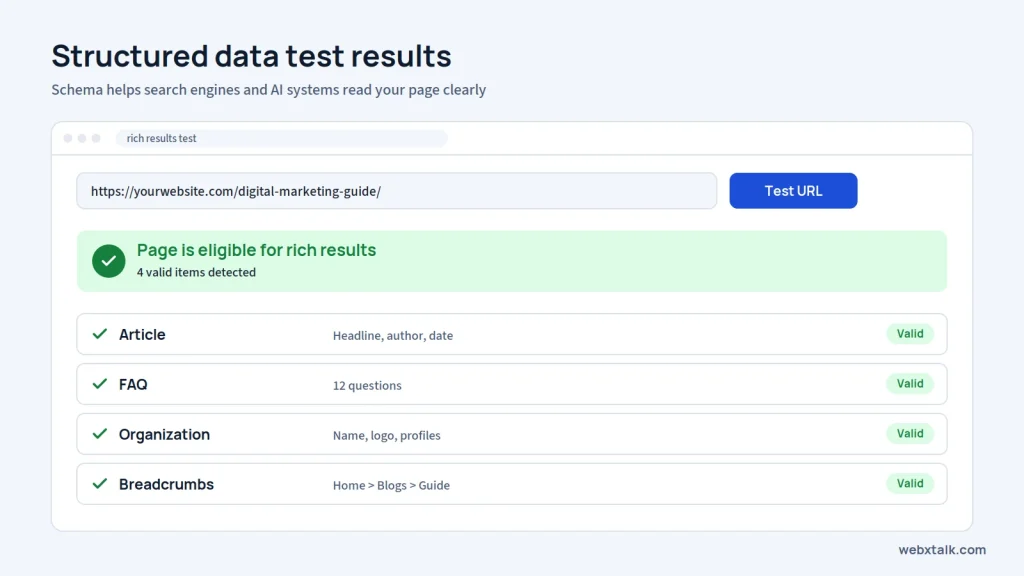
Use schema markup such as Organization, Article, FAQPage and LocalBusiness so search engines and AI systems can read your content clearly.
Let AI speed up research, outlines, and first drafts, but have a person check facts, add experience and edit the final copy. Unedited AI content tends to sound generic and can include errors.
For a deeper look, read our guide on AI SEO in 2026. Webxtalk also helps brands track and improve how often they appear in AI answers.
Chapter 8 explains how to measure your results so you know where your money and time are working.
Or, skip ahead to Part 2 and website design & conversion rate optimization!
Digital marketing analytics is all about monitoring and measuring each channel’s performance to determine its impact on your business objectives. For most beginners, free solutions, such as Google Analytics 4 and Google Search Console, as well as the dashboards included in Google Ads, Meta Business Suite and LinkedIn, will be enough.
Without tracking, you are guessing. Analytics helps you:
Here’s how to approach it.
First install Google Analytics 4 and link Google Search Console. Install form, call, and purchase tracking, and create links to use UTM tracking codes in emails, social posts and ads so that every visit is attributed to the correct campaign.
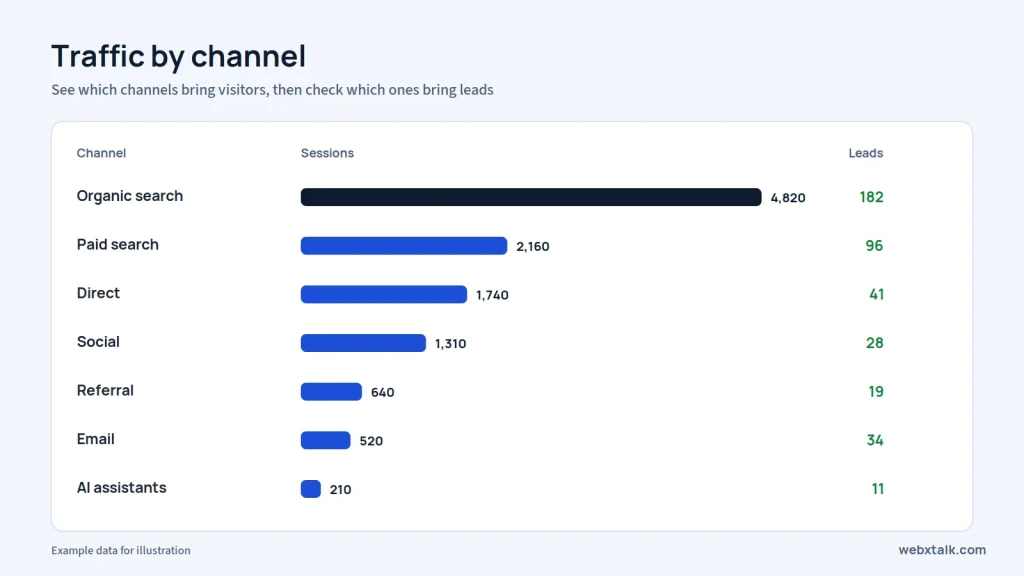
Focus on numbers tied to revenue rather than vanity metrics. Useful ones include:
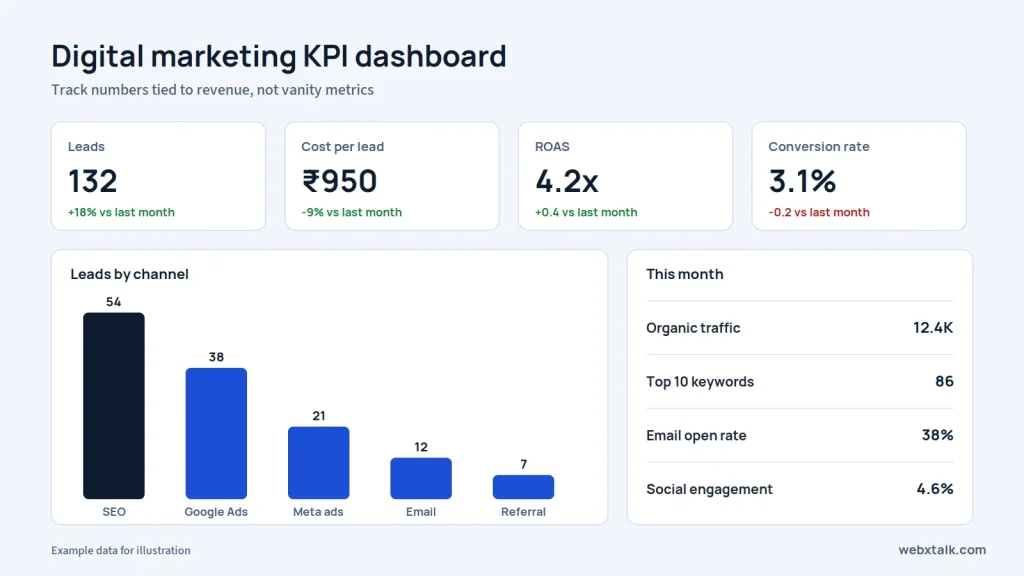
Talk to stakeholders about what they expect from marketing, then turn that into specific, measurable targets, such as 50 qualified leads a month or a cost per lead under a set amount.
Check paid campaigns weekly and organic channels monthly. Remember that SEO and content usually need 3 to 6 months to show real movement, and account for seasonal changes before drawing conclusions.
A one-page monthly report showing results by channel, what changed and what you will do next is more useful than a 40-page data dump.
Part 2 is about more than the basic channels. It features all of the big digital marketing services, high-level strategies that savvy marketers employ, and how they can be combined into a strategy.
Your website is where every other channel sends people. Chapter 9 shows how to build a site that turns visitors into customers.
Or, skip ahead to the next chapter on video and YouTube marketing!
Website design for marketing means building a site around one job: it must assist your visitors in discovering and interacting with the thing you offer. Looks matter, but speed, clarity, and an easy path to contact or purchase matter more. Examples of common platforms are WordPress, Shopify, React, and simple static sites.
Conversion rate optimization is the practice of raising the percentage of visitors that complete a desired action (or conversion) like filling a web form, calling, booking, or purchasing. For every 1,000 visitors, 20 people convert into leads giving you a 2% conversion rate. So, if you increase that to 4%, you’ll double your traffic without a penny more being spent.
Every channel in this guide costs time or money to bring visitors in. A slow, confusing website wastes all of it. A strong site helps you:
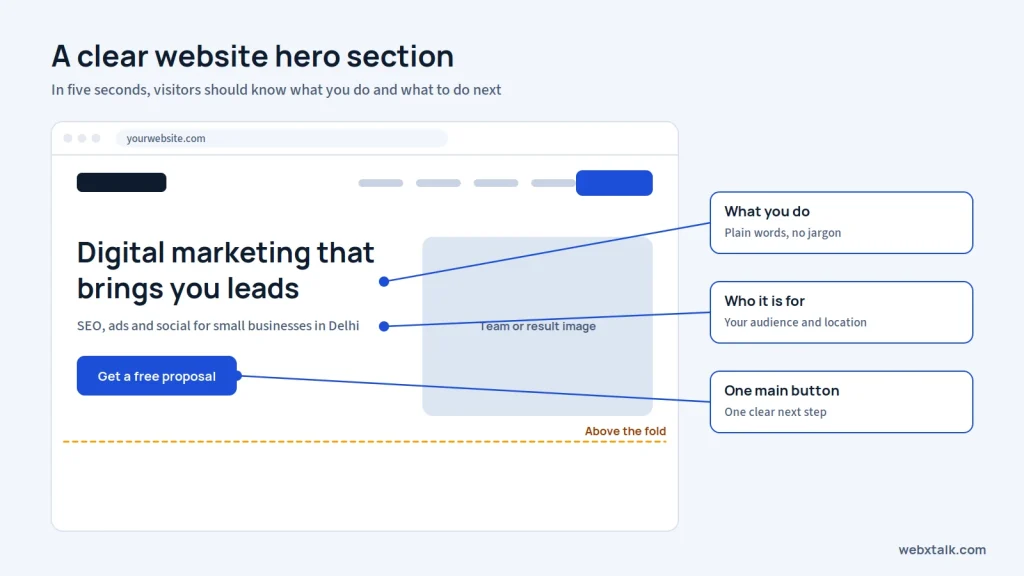
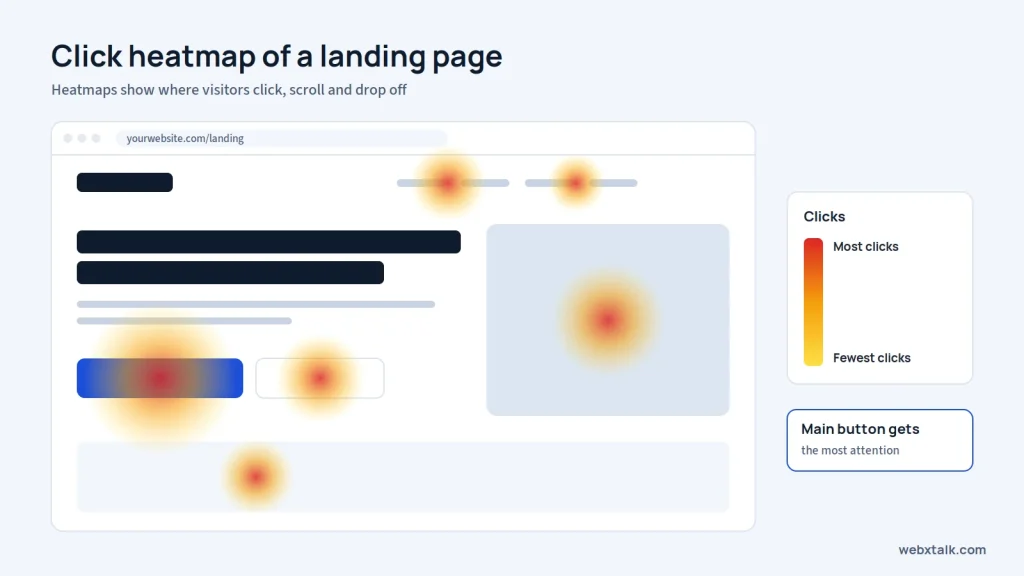
Within five seconds, a visitor should know what you do, who it’s for and what to do next. Put a clear headline, a short supporting line and one main button above the fold.
Most visitors arrive on a phone. Use large tap targets, short forms, readable fonts and click-to-call buttons.
Optimize images, use modern formats such as WebP, avoid too many plugins and use quality hosting with a CDN. In Google Pagespeed Insights, review your Core Web Vitals.
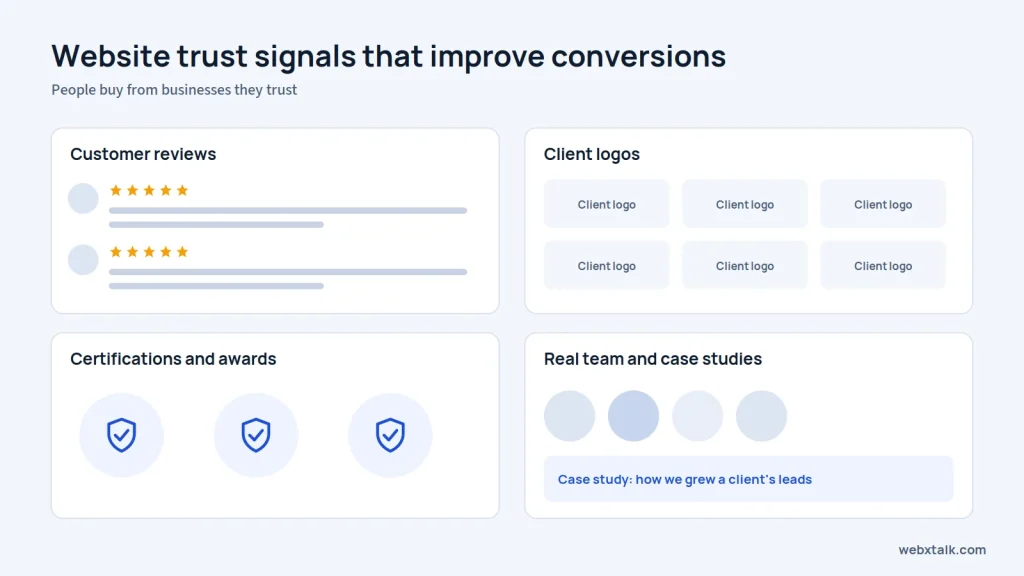
Show reviews, client logos, case studies, certifications, real team photos and clear contact details. People buy from businesses they trust.
Each service, campaign and location deserves its own page with one goal. A focused page converts far better than a general one.
Ask only for what you need. Every extra field gives people another reason to leave.
Chapter 10 covers how to use video to explain, entertain and sell.
Or, skip ahead to the next chapter on local marketing and reputation management!
Video marketing is the use of video content to promote your brand, products or services. It contains long video content, short-form videos like Reels and Shorts, product demos, product testimonials, webinars, live streams and video ads.
Video tells a story that text cannot as it demonstrates how a product works, reveals your team, and tells what your customers think of you. The mentioned below are the reasons why it is helpful:
Use YouTube’s search bar suggestions and keyword tools to find what your audience is searching. “How to”, “best”, “vs,” and “review” topics work especially well.
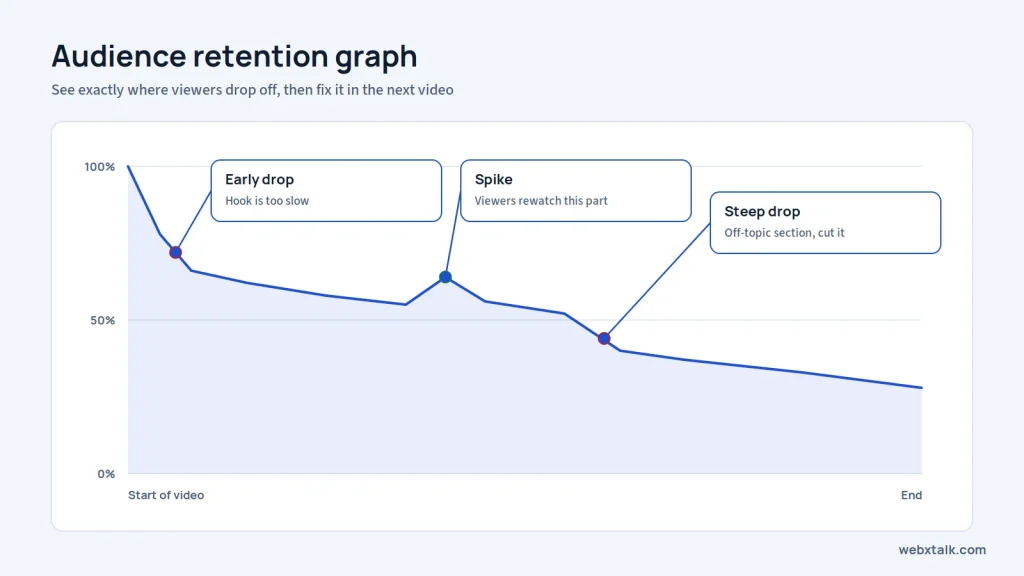
State the problem or the payoff immediately. Skip long intros and logo animations.
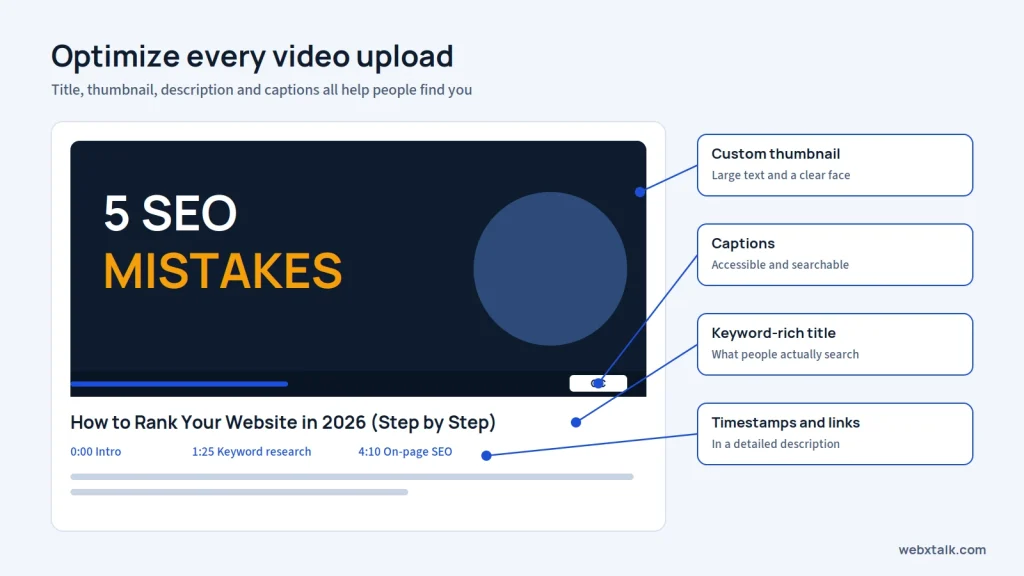
Create keyword optimized title, detailed description, timestamps and links, tags and captions. Create a custom thumbnail that features a large text and clearly visible face or product.
Use long videos for depth and search traffic, and Shorts or Reels for reach and discovery. Clip short highlights from every long video.
Tell viewers what to do next: subscribe, visit a page, book a call or download a guide. Use end screens and pinned comments to make it easy.
Chapter 11 explains how to win customers in your city and protect your brand’s reputation online.
Or, skip ahead to the next chapter on e-commerce marketing!
Local marketing consists of the marketing mix strategies that will assist local customers in identifying and selecting your business. It includes all local SEO, Google Business Profile optimization, local ads, local listings, and community engagement.
Online reputation management is the practice of monitoring, improving and protecting what people see and say about your brand online. It covers reviews, social media mentions, search results for your brand name and how AI tools describe you.
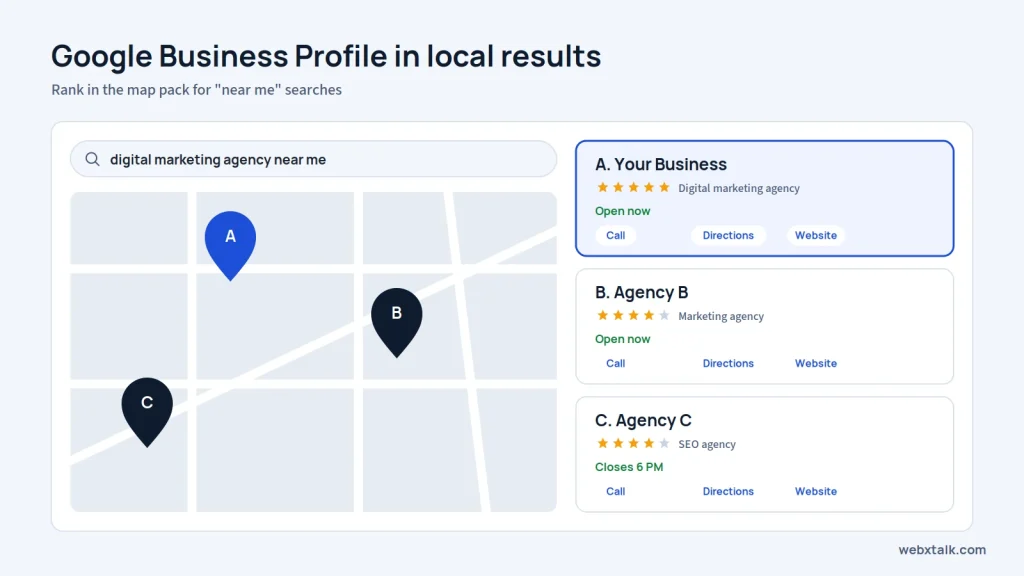
People who search for “near me”, “open now” and “best [service] in [city]” typically are ready to make a decision. Being included in the Google Map Pack for these queries can generate calls, visits and bookings on a daily basis.
Reputation matters just as much. Most people read reviews before choosing a local business, and a few unanswered negative reviews can push them to a competitor.
Select correct primary category, include services, hours, photos and comprehensive description. Post updates and offers frequently and respond to common questions.
Use the same business name, address and phone number on your website, Google, Facebook and local directories. Even small differences can confuse customers.
Serve more than one city? Create a page for each location that has local information, photos and customer reviews. Do not duplicate the same content and just change the city’s name.
After a job or sale, send customers a direct link to leave a review. Email, text or WhatsApp can all work. Never pay for reviews or offer rewards in exchange for them.
Thank customers for positive feedback. If someone leaves a complaint, respond politely and try to resolve the issue. Other people may read your reply before deciding to contact your business.
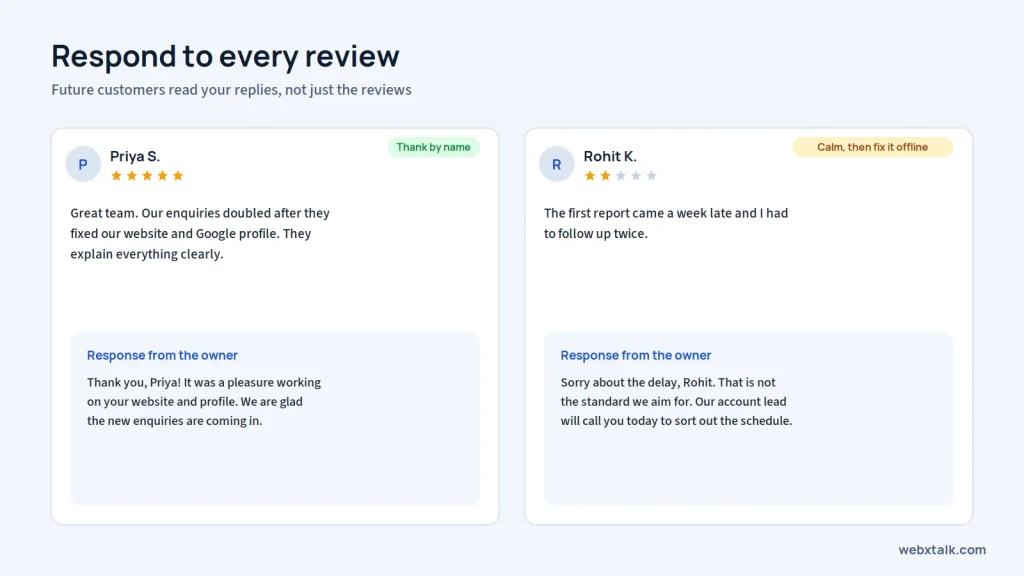
Check your business name from time to time on the internet and on social forums. This enables you to identify complaints, respond to questions and resolve issues at an early stage.
Chapter 12 is for brands that sell products online, whether through their own store or marketplaces.
Or, skip ahead to the next chapter on influencer and affiliate marketing!
E-commerce marketing refers to any marketing efforts that are used to help get traffic to an ecommerce website, and convert that traffic into sales. Includes product SEO, Shopping ads, Social commerce, Marketplaces (Amazon, Flipkart), Email/SMS automation, and conversion optimization of product & checkout pages.
Online stores have many product pages, thin margins and buyers who compare prices in seconds. Success depends on:
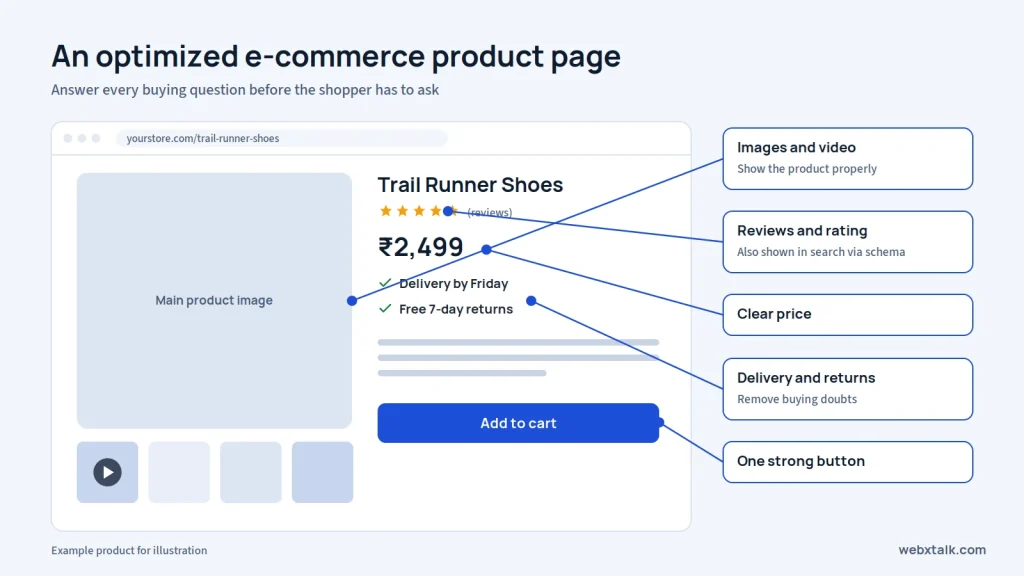
Create original product titles and descriptions, include quality images and video, prominently display price, delivery time and return policy, and with cleary seen reviews. You can add Product schema to your products so that Google can display prices and ratings in product results.
Category pages often rank for broader, high-volume searches like “men’s running shoes”. Add helpful intro text, filters and internal links.
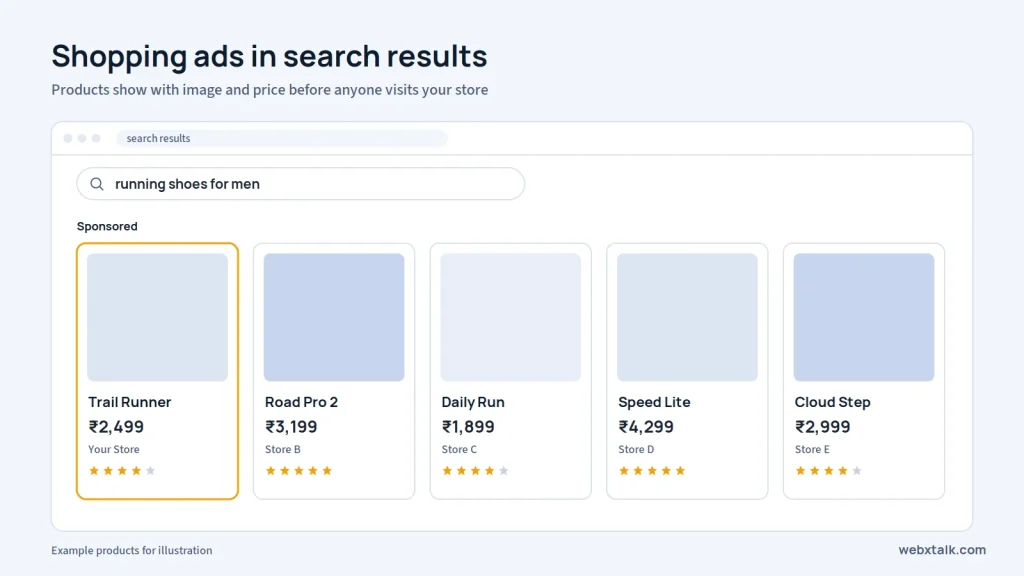
Optimize a clean product feed for Google Merchant Center and launch Shopping or Performance Max campaigns. Free product listings on Google are also available.
Set up Instagram and Facebook Shops, tag products in posts and run catalog-based ads that show each person the products they viewed.
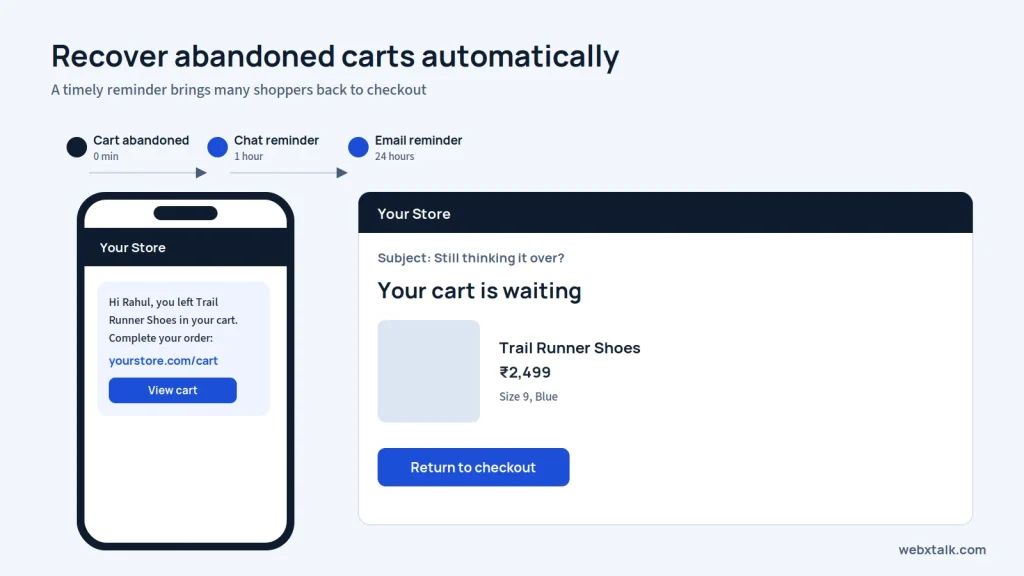
Send automated email, SMS or WhatsApp reminders within hours of an abandoned cart, with a clear link back to checkout.
Amazon, Flipkart and others have a massive traffic base, but impose fees and manage the customer relationship. Many brands incorporate them into their reach, and ultimately create their own store to promote loyalty and margins.
See Webxtalk’s digital marketing for e-commerce businesses and Shopify website services.
Chapter 13 covers how to grow by partnering with creators and publishers who already have your audience’s attention.
Or, skip ahead to the next chapter on WhatsApp, SMS and mobile marketing!
An influencer marketing campaign is a collaboration between a content creator and your brand, where the creator shares your content with their audience on Instagram, YouTube, LinkedIn or another platform. Influencers come in all shapes and sizes from nano creators who have a few thousand followers to celebrities who have a few million followers.
Affiliate marketing is a type of performance-based marketing, meaning that the affiliate will only receive a commission for each sale or lead that they are able to provide for you. Bloggers, coupon sites, comparison sites, YouTubers and other companies are all examples of affiliates and are tracked by unique links or codes.
People often trust recommendations from creators they follow more than brand ads. Partnerships help you:
Look at audience fit, engagement rate and content quality, not just follower count. Smaller accounts with an established niche audience may perform better than the larger accounts on cost per result.
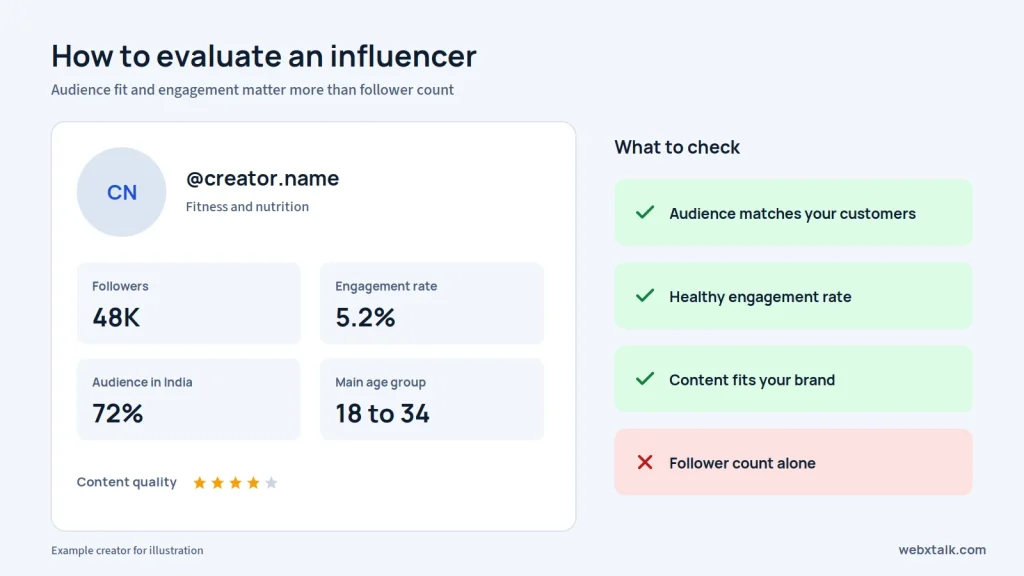
Agree on deliverables, posting dates, usage rights, payment and key messages in writing. Leave room for the creator’s own style, since that’s why their audience trusts them.
Paid partnerships must be clearly labeled, for example with #ad or the platform’s paid partnership tag. Regulators like the FTC in the USA and ASCI in India have published guidelines for this.
Give each partner a unique link, UTM code or discount code so you can measure clicks, sales and cost per acquisition.
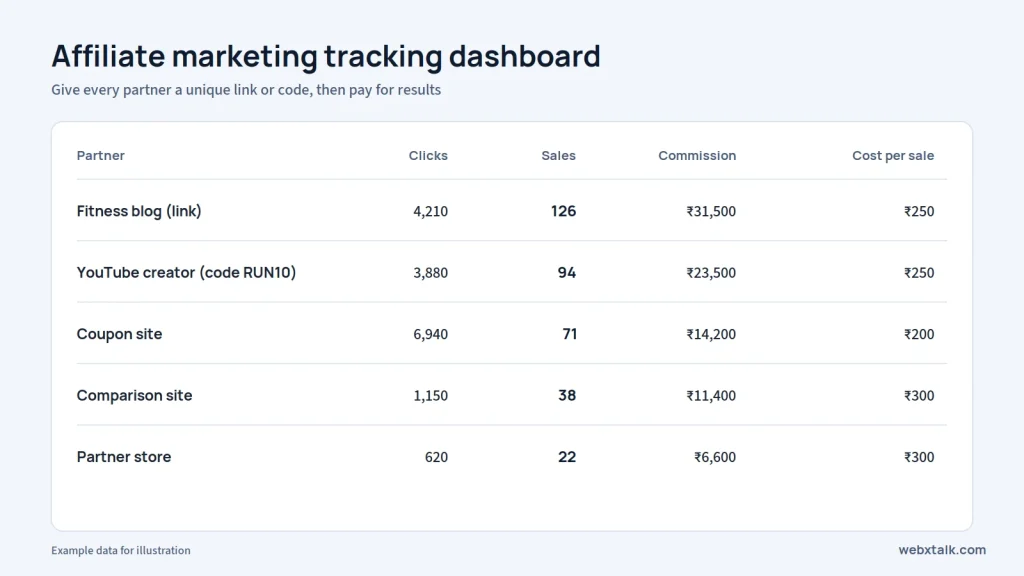
Manage links, commissions and payouts using a platform like Impact, PartnerStack or Shopify affiliate apps. Provide affiliates with banners, product information and offers to promote.
Chapter 14 covers marketing on the device your customers carry everywhere.
Or, skip ahead to the next chapter on marketing automation, CRM and funnels!
Mobile marketing is any marketing designed to reach people on their smartphones. It features WhatsApp Business messaging, SMS, push notifications, in-app ads, and mobile-first website and app store optimization (ASO) for businesses that have an application.
Most internet use now happens on mobile phones. Messaging channels in particular offer:
In markets like India, WhatsApp is often the preferred way for customers to talk to businesses.
Set up a verified business listing that includes your catalog, hours, address and quick answers. The WhatsApp Business Platform (API) can be accessed by larger businesses with a provider for bulk messaging and other features such as WhatsApp chatbots and CRM integration.
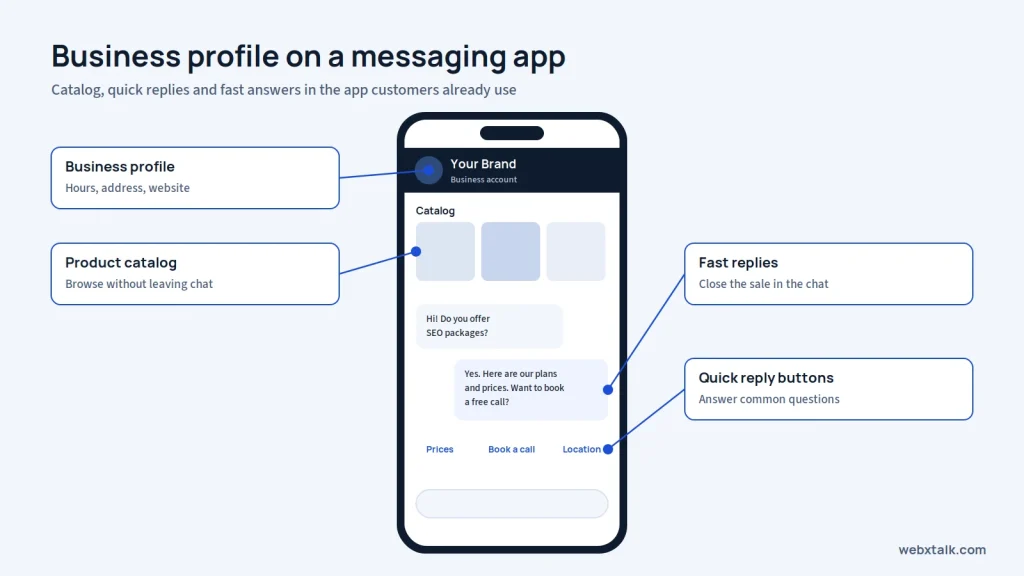
Only message people who have agreed to hear from you. Add WhatsApp and SMS opt-in boxes to forms and checkout, and use click-to-WhatsApp buttons and ads.
Order updates, appointment reminders, back-in-stock alerts and exclusive offers are effective. Don’t send too many messages, or they’ll block you.
State the offer, add a short link and include an opt-out option. Follow local rules, such as DLT registration for commercial SMS in India and TCPA rules in the USA.
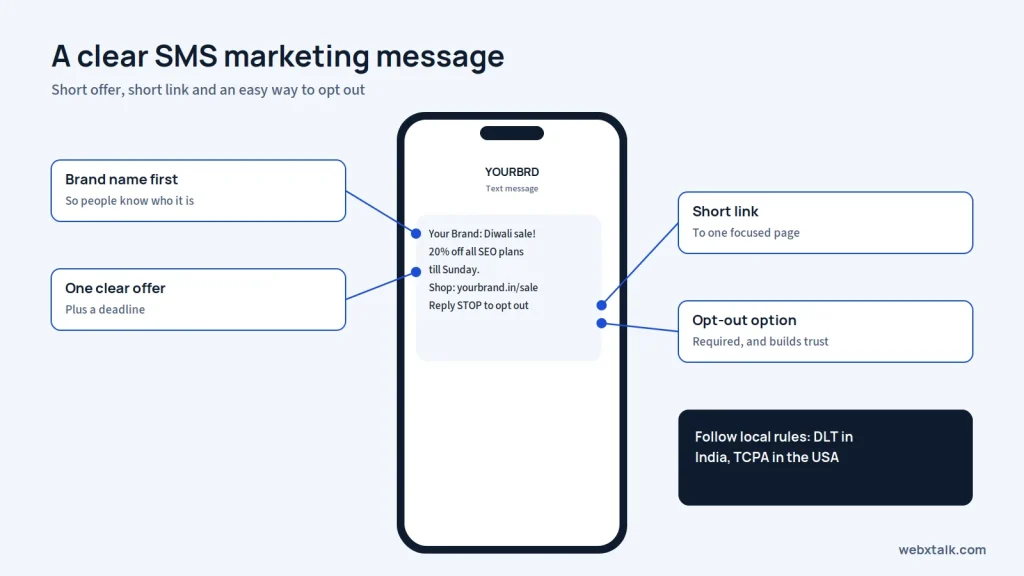
It’s essential that every landing page, email and ad can be easily read and acted upon from a phone.
Chapter 15 shows how to connect your channels into a system that nurtures leads automatically.
Or, skip ahead to the next chapter on advanced paid media!
A marketing funnel is the path people take from first hearing about you to becoming a paying, loyal customer. A common version has three levels:
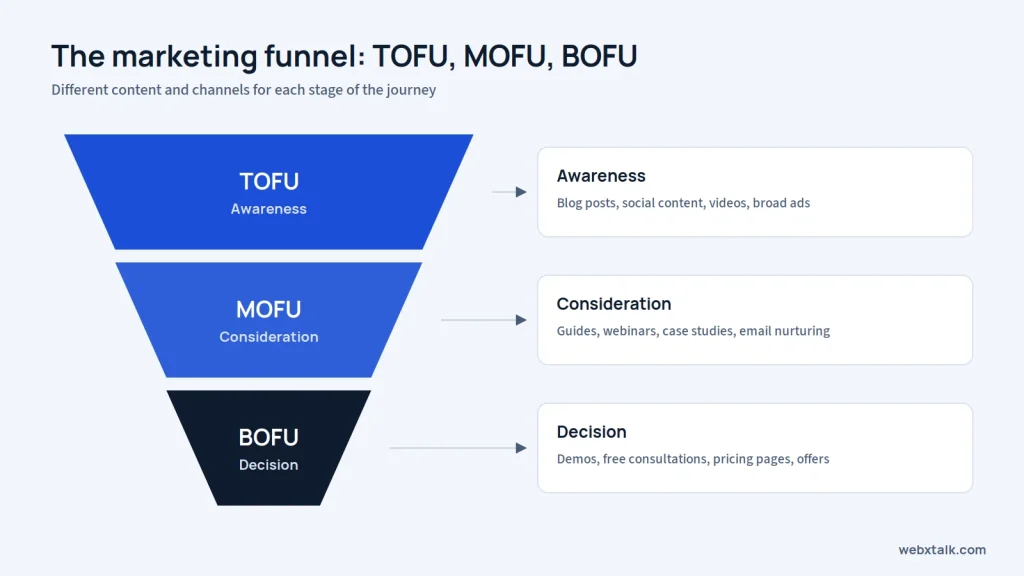
A CRM (customer relationship management) system manages all of your leads and customers along with their contact information, source of the lead, conversations and deal status. Popular options include HubSpot, Zoho CRM, Salesforce and Pipedrive.
Marketing automation sends the appropriate message at the right time, without any manual effort, like a follow-up email to users who download a guide, or an alert to sales when a lead checks out the pricing page.
Most leads aren’t ready to buy on day one. Without a system, they get forgotten. Automation and CRM help you:
Write down each stage, what content fits it, and what action moves someone to the next stage.
Offer something valuable in exchange for contact details, such as a checklist, template, calculator, free audit or webinar.
Send every website form, ad lead and chat enquiry straight into the CRM with its source recorded.
Set up a series of 4 to 7 emails or WhatsApp messages that educate, share proof and invite the lead to take the next step.
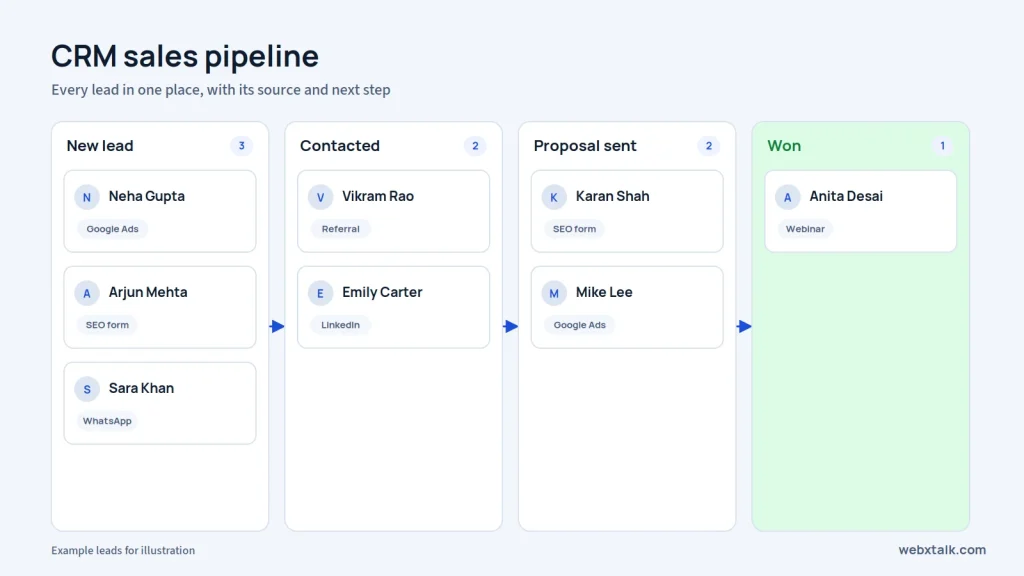
Give points for actions like opening emails, visiting key pages or requesting pricing. Pass high-scoring leads to sales right away.
Chapter 16 builds on the PPC basics in Chapter 5 and covers how experienced advertisers scale profitably.
Or, skip ahead to the next chapter on advanced SEO and GEO!
Advanced paid media refers to the use of automated bidding, layered audiences, a full-funnel structure and accurate measurement to manage paid campaigns across platforms, including Google, Meta, LinkedIn, YouTube and more. The objective changes from clicks to profitable customers on a large scale.
As budgets grow, small inefficiencies become expensive. A campaign that wastes 20% of a small budget is an annoyance. At a large budget it can wipe out profit. Advanced setups help you spend more while keeping cost per acquisition under control.
Smart bidding with good data
Automated strategies such as Target CPA, Target ROAS and Maximize Conversions are only as effective as the conversion data that you provide them. Follow up on actual results like qualified leads or sales and capture offline conversions from your CRM, if available.
Full-funnel campaign structure
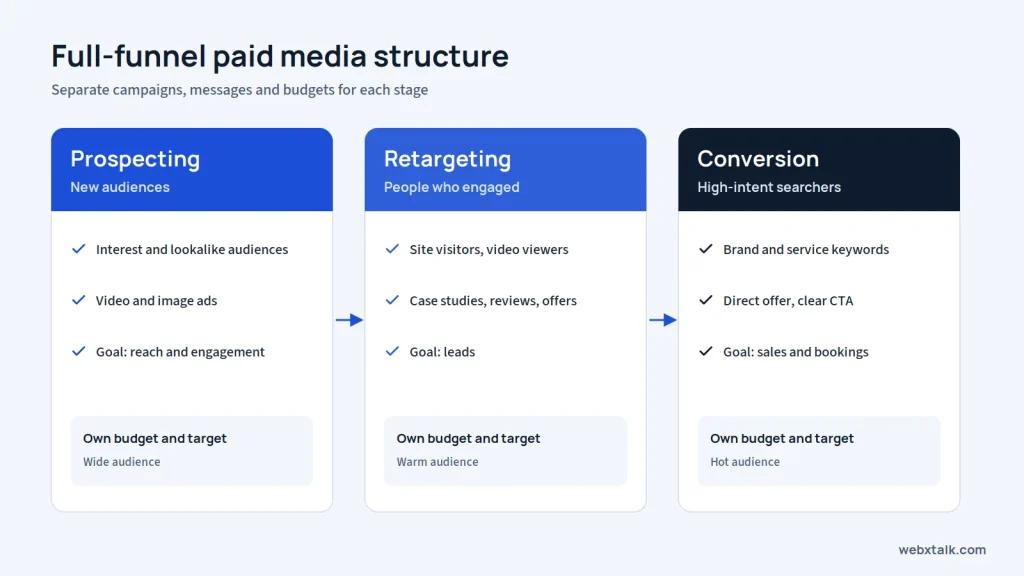
Run separate campaigns for prospecting new audiences, retargeting people who engaged, and converting high-intent searchers. Each stage gets its own message, budget and target.
Retargeting and audience layering
Reconnect with people based on the pages they visited and how recently they showed interest. Customer lists, website visitors, video viewers, and similar audiences can help refine targeting.
Performance Max and Advantage+
Google Performance Max and Meta Advantage+ use automation to reach potential customers across placements. Strong creatives, accurate product feeds, and useful customer data give these campaigns a better starting point. Review reports regularly to understand what is working.
Creative testing
Ad performance often depends on the message and format. Test different hooks, visuals, and angles to see what catches attention. Replace creatives when engagement or conversions begin to decline.
Attribution and incrementality
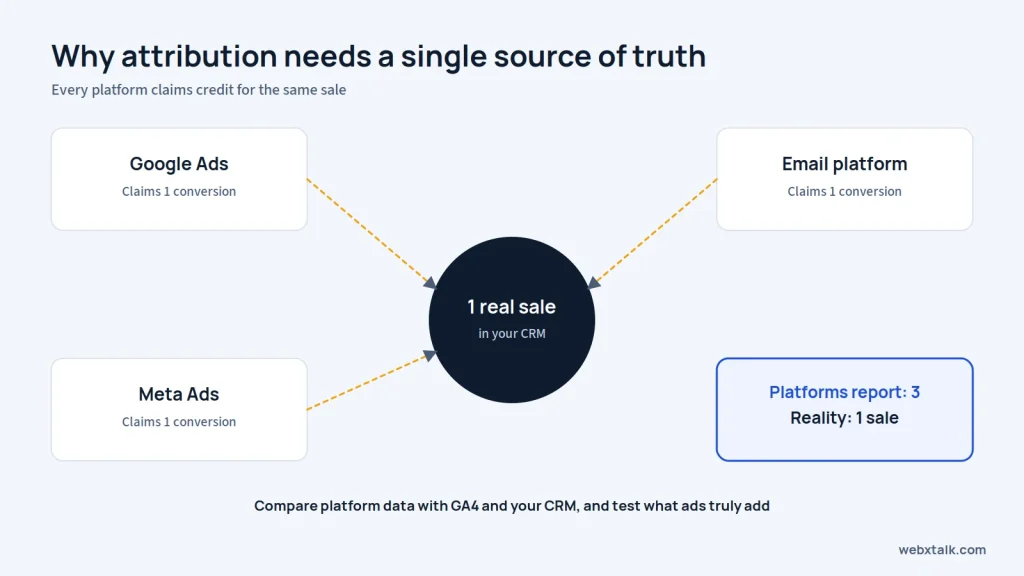
Different ad platforms may claim credit for the same conversion. Compare their reports with GA4 and CRM data. Holdout groups or geographic tests can help reveal whether advertising is generating additional results.
Server-side tracking
Browser privacy settings and cookie restrictions can make conversion tracking less reliable. Tools such as Google Enhanced Conversions, Meta Conversions API, and server-side tagging can help improve measurement when configured correctly.
LinkedIn for B2B
B2B campaigns can target audiences by job role, company size, and industry. Lead generation forms, thought leadership ads, and account lists are useful options when promoting high-value products or services.
Webxtalk manages Google Ads and social media advertising campaigns for businesses that want to scale without wasting budget.
Chapter 17 goes beyond the SEO and AI basics in Chapters 2 and 7, covering how established sites grow organic visibility in both search engines and AI answers.
Or, skip ahead to the next chapter on building a digital marketing strategy!
Advanced SEO can help a website go beyond the basics, by improving the structure of the site, the relevance and usefulness of the content, and the depth of the knowledge about the key topic. Generative engine optimization (GEO) is enhancing your business to show up in AI-generated answers on platforms like ChatGPT, Gemini, Perplexity, Claude and Google AI Overviews.
Basic SEO gets you in the game. Competitive keywords and AI recommendations usually go to brands that search engines see as the clear authority on a topic. Advanced work is how you become that authority.
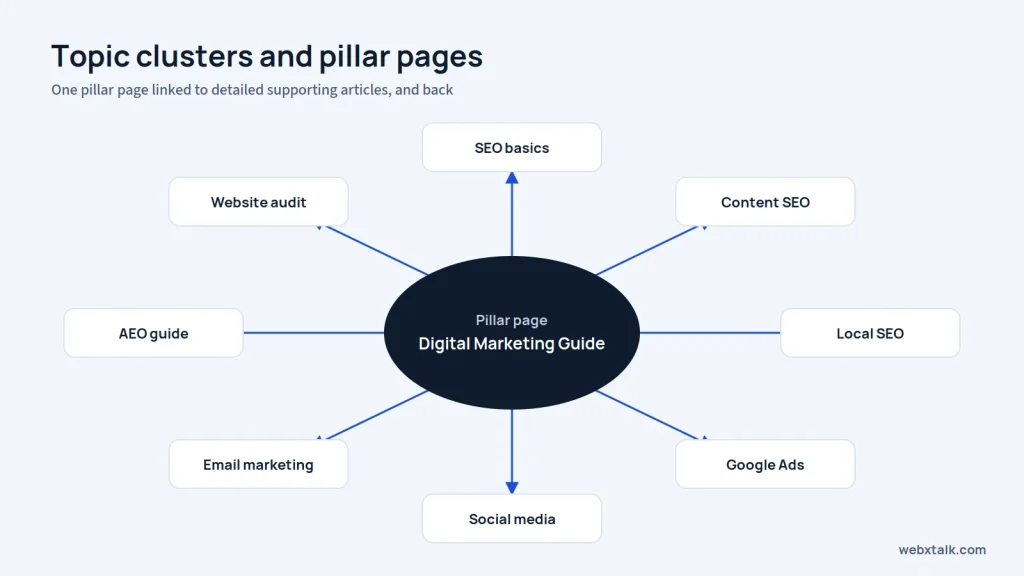
Develop a pillar page around every key subject area, such as this guide, and connect to detailed support pages. Connect all supporting articles to the pillar. This indicates a search engine how much knowledge you have.
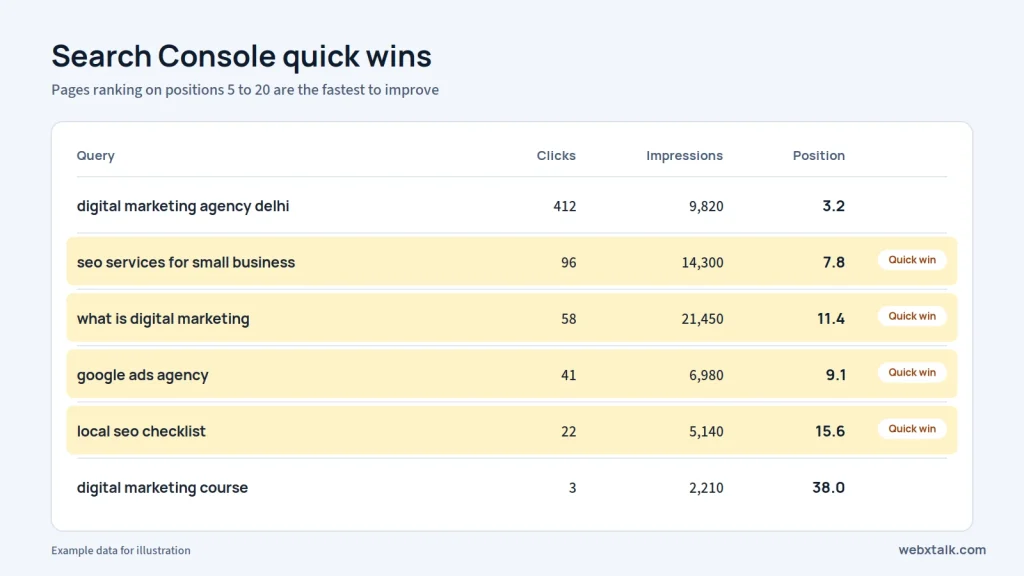
Identify pages that are ranking within the first 20 pages, queries that have a high number of impressions and low click-through rates and pages that are losing traffic. Fixing these can sometimes lead to quicker success than creating new content.
Update outdated pages, merge thin or overlapping articles into one stronger page, and redirect the old URLs.
Make sure important pages get the most internal links, fix orphan pages, and use descriptive anchor text.
On larger sites: control crawl budget, faceted navigation, canonical tags, javaScript rendering and log file analysis. Maintain good Core Web Vitals within templates.
If you target several countries or languages, use hreflang tags, a clear URL structure by country, and content localized for each market, not just translated.
Publish original research, data studies and expert commentary that journalists and bloggers want to cite.
Use clear definitions, answer-first paragraphs, specific numbers with sources, FAQs and structured data. AI tools favor content that is easy to quote and verify.
Ensure consistency of your brand name throughout your website, Google Business Profile, LinkedIn, Wikipedia type directories and industry websites. Get attention in reputable news outlets and forums!
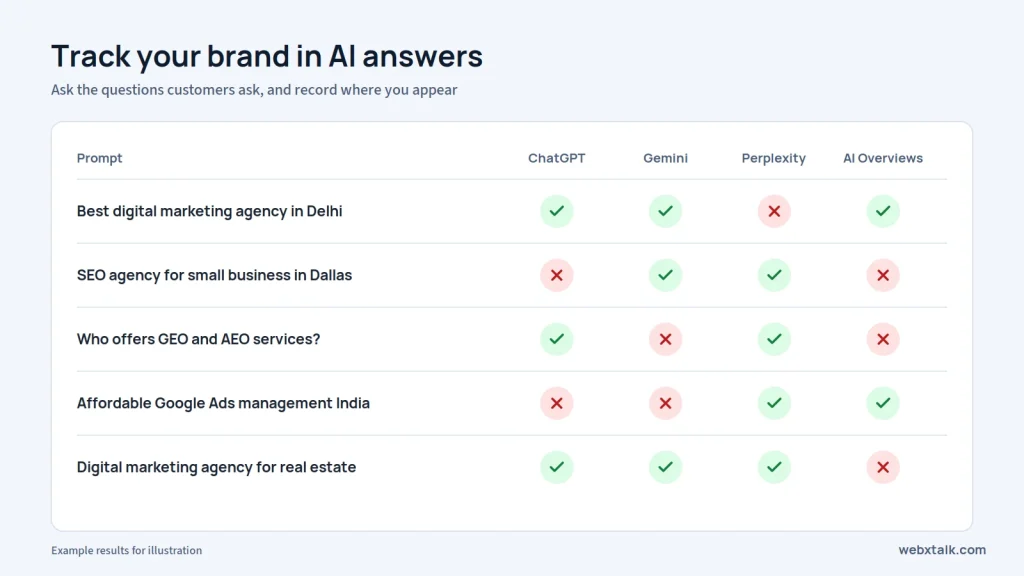
Inquire about the same questions your customers have of AI tools and note whether your brand pops up, how it’s described, and the sources it mentions. Take this as a reference when planning for content and PR.
Chapter 18 brings every channel together into one plan you can actually run.
Or, skip ahead to the next chapter on the digital marketing tools stack!
A Digital Marketing Strategy is a written document that outlines your goals, target audience, channels, budget, timeline and measurement of success. It converts random activity into a structured system, with every channel with a specific task.
Without a strategy, businesses post randomly, run ads without clear goals and jump to new channels before the old ones have had time to work. A strategy helps you:
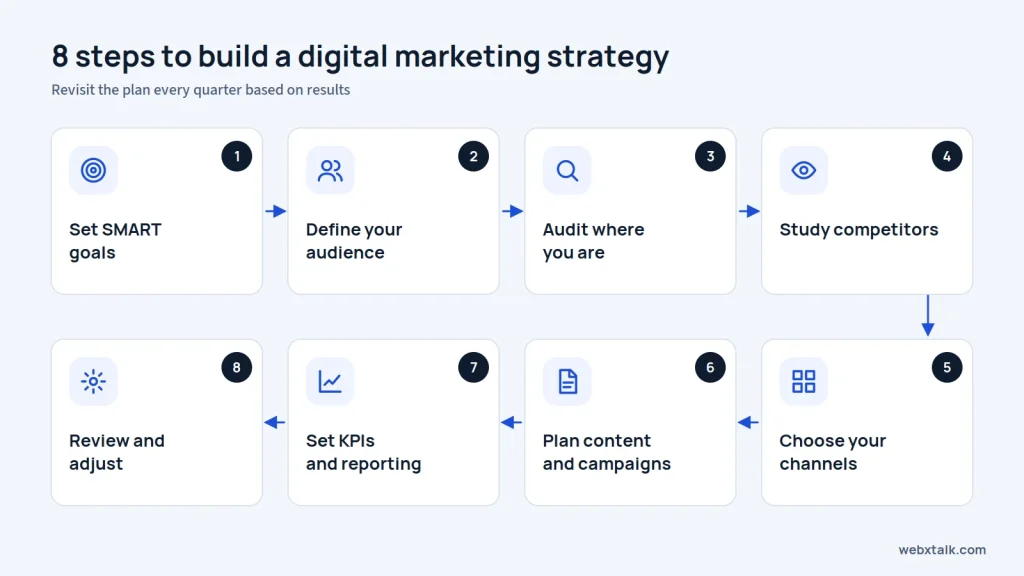
There is no single right number. The budget depends on your industry, competition, goals and stage of growth. A practical approach:
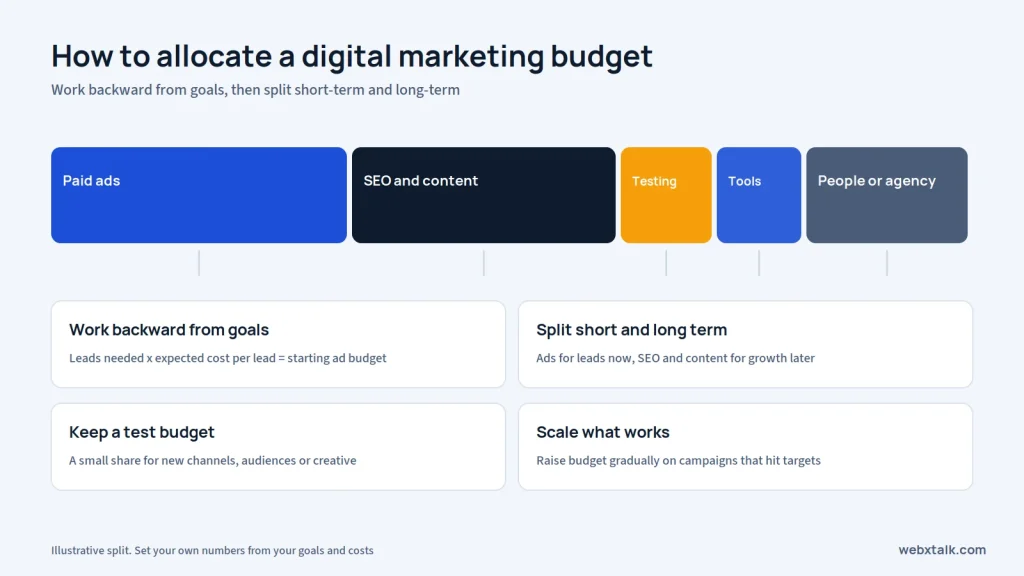
See Webxtalk’s digital marketing solutions and ready-made SEO, SMO and SMM packages for fixed monthly options.
Chapter 19 lists the tools most teams use, grouped by job. Start with the free options and add paid tools only when you need them.
Or, skip ahead to the next chapter on industry-specific digital marketing!
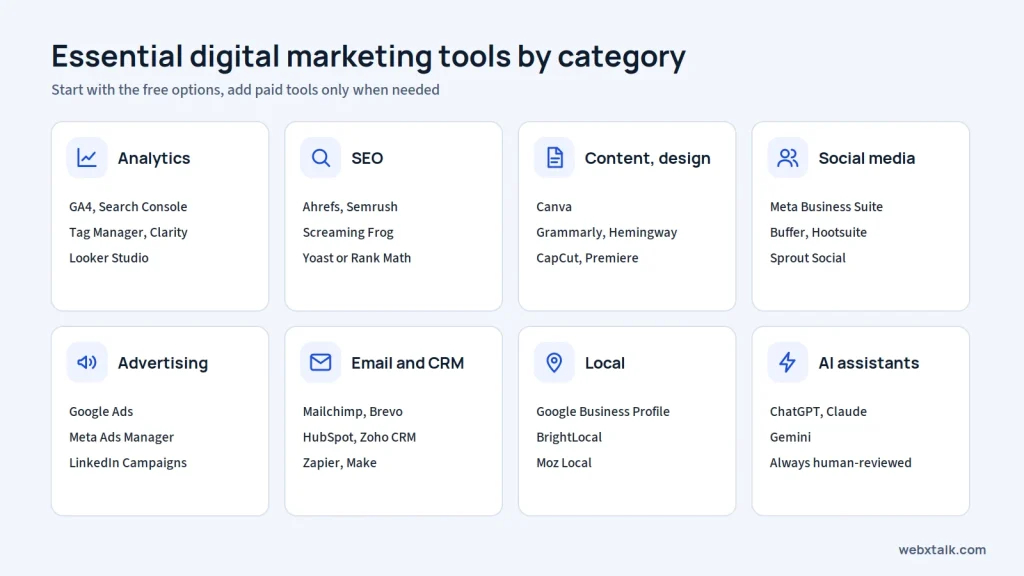
You don’t need a bunch of tools to get started with digital marketing. Google Analytics 4 and Search Console help you track your website’s performance, while Google Business Profile, Canva, Meta Business Suite, and an email platform cover the basics of managing your online presence.
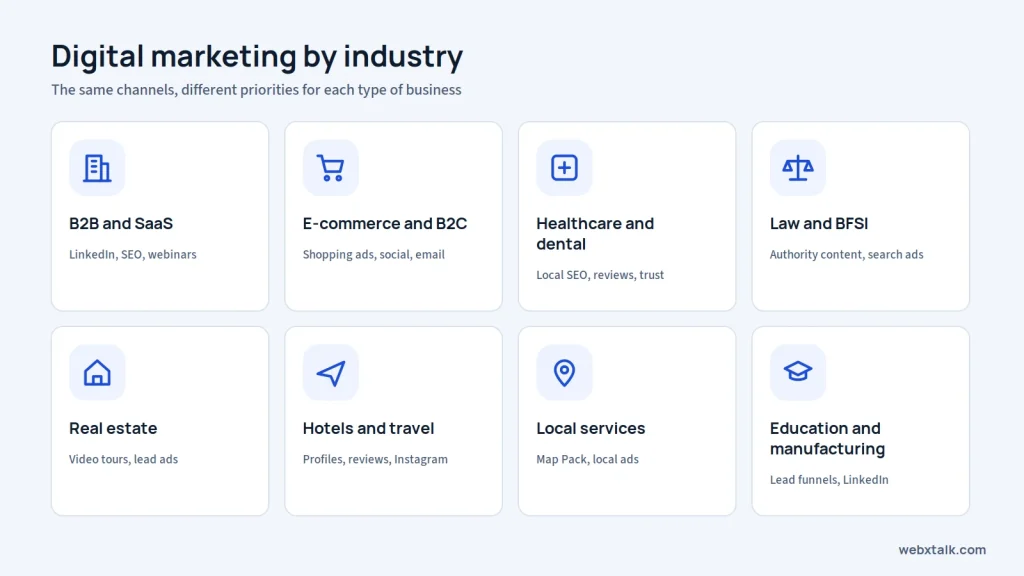
There are lots of methods used by the same channels in various industries. Chapter 20 illustrates where each type of business needs to be focused first.
SEO, thought leadership content, LinkedIn, webinars, free trials or demos, and long nurture sequences.
B2B · SaaS
Shopping ads, social commerce, influencers, email and SMS automation.
E-commerce · B2C
Local SEO, reviews, trust-focused content and strict compliance with medical advertising rules.
Healthcare · Dentists
Authority content, local SEO, reputation management and high-intent search ads.
Law firms · BFSI
Listing visibility, video tours, Meta lead ads, WhatsApp follow-ups and local landing pages.
Real estate
Google Business Profile, reviews, Instagram, seasonal campaigns and booking-focused ads.
Hotels and restaurants · Travel and tourism
HVAC, gyms, interior designers: local SEO, Map Pack rankings, local service ads, reviews and before-and-after content.
HVAC · Gyms · Interior designers
Admission or lead funnels, explainer content, LinkedIn and trade-focused SEO.
Schools · Startups · Manufacturing
Browse all industries on Webxtalk’s industry page.
Use this roadmap to see where you are and what to learn next.
STAGE 1
Months 1 to 3
STAGE 2
Months 4 to 12
STAGE 3
Year 2 and beyond
Ready to put this into action? Here’s a simple starting plan:
Once the basics are working, add new channels one at a time and keep the ones that bring real results.
You don’t have to do everything at once. Start by improving your website, sharing useful content, staying active on a couple of social platforms, and checking your results. Even small changes can make a difference when you keep at them.
As your business grows, marketing can become harder to manage alone. That’s when expert support with SEO, paid ads, social media, content, and AI search can help bring everything together. Webxtalk works with businesses across India, the USA, and other markets to help them improve their online presence.
Whether you handle marketing yourself or bring in a team, keep the focus on reaching the right audience, building trust, and understanding what brings results.
Digital marketing is a method to promote brands and companies online. This process includes emails, search engines, social media, and online ads to reach targeted customers.
Its primary approaches are SEO, content marketing, social media, paid advertising, email marketing, and video marketing. AI search optimization is also gaining importance. The right mix will be determined by the places where the audience is found and the business’s growth plans.
Paid ads can start bringing traffic within days, while SEO often takes three to six months to show meaningful progress. Social media and email usually need consistent effort to build an audience and encourage action.
Costs depend on the services, competition, and goals. Free options like organic social media and a Google Business Profile are good starting points, while paid ads and agency support require a budget. Start with what you can manage, then invest more in channels that deliver results.
Yes. Simple tasks such as posting to social sites, replying to reviews and composing basic content can be managed in-house. For more complex tasks, including technical SEO, managing paid campaigns, and performance analysis, specialized expertise might be required.
SEO is one part of digital marketing. It focuses on improving visibility in unpaid search results, whereas digital marketing covers a wider range of channels, including paid advertising, social media, email, and content marketing.
Yes. People still need reliable information when researching products and services, even when they use AI tools. Helpful website content, accurate business details, and credible reviews can strengthen online visibility and make a business easier to understand across search platforms.
A good starting point is local SEO, a complete Google Business Profile, and customer reviews. Choose one social platform that fits your audience, too. If you need leads sooner, a modest Google Ads campaign may help before you expand into other channels.
SEO is designed to drive unpaid traffic, and typically requires a period of sustained growth. PPC involves paying for ads to drive traffic to a website, and this can happen sooner, but it is dependent on ongoing advertising budgets. Combining both can achieve a balance between the long-term growth and short-term visibility.
A digital marketing funnel describes how someone moves from discovering a business to becoming a customer. It generally includes awareness, consideration, and decision stages. Educational content may attract attention early on, while product comparisons, demos, and offers can help people make a choice.
Start with SEO, content writing, social media and analytics. After learning the fundamentals, you can then progress to paid advertising, email marketing, conversion rate optimization and AI search. The use of a real website or campaign can help to translate that knowledge into skills.
Traditional marketing uses channels such as television, radio, newspapers, and billboards. Digital marketing reaches people through websites, search engines, email, and social platforms. The core idea is the same to reach the people but the methods and tools are the one that makes the difference.
Writers

Amit Mishra
CEO & Digital Marketing Expert
Dive Deeper
Webxtalk
Based on 103 reviews
Get A Free Proposal
We just need a few details to begin.
 Yes, I Want Growth