
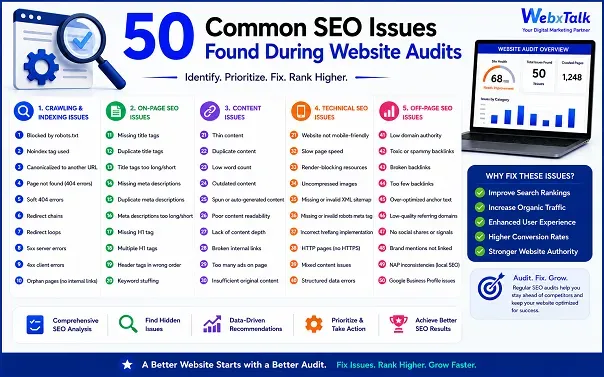
50 Common SEO Issues Found During Website Audits
An SEO audit reveals these issues. It shows you exactly what’s holding your site back, so you can fix the right things in the right order.
This guide explains 50 common issues found during website audits. We’ve categorized them into technical, on-page, content, authority, and user experience, and provided a practical solution for each of these, so you can quickly scan and take action.
Why Website Audits Matter for Growth?
Organic search can be a major source of qualified leads for businesses. A well-ranked site attracts buyers who are already searching for a solution, at a lower cost than paid advertising.
But rankings don’t hold steady on their own. Algorithms change. Content ages. As sites expand, new pages are added, and redesigns are made, technical debt accumulates. These problems are unnoticed until traffic begins to decline, and it becomes more difficult to determine the cause.
A structured audit provides your team with a list of what to fix first, not what they think to fix first, but what really matters. That’s the true power here, not only to find problems, but to prioritize the ones that are most important to your revenue. A well-done audit will also distinguish between issues that need to be addressed and those that can be postponed.
Signs Your Website Needs an SEO Audit
Some companies only conduct an audit when traffic starts to crash. In reality, there are a few early warning signs to watch for:
- Organic traffic has plateaued or declined for two or more consecutive quarters, even though your team hasn’t reduced content output.
- The rankings for your core keywords have dropped, particularly if you’ve been outranked by a competitor in the last few months.
- Your site has been redesigned, moved, or changed to a new CMS, as these can cause new technical problems.
- Bounce rates or time-on-page have decreased, which may indicate content or user experience issues.
- You have not conducted a full audit, or it has been over a year since the last audit.
Any of these is a good enough reason to schedule a review. They typically refer to a number of the issues addressed in this guide.
SEO Audit Tools Used to Find These Issues
Most audits are not purely automated, but rather a mix of automated crawling tools and manual review.
- Site crawlers scan all pages in bulk, marking broken links, missing tags, duplicate content, and other technical issues.
- Google Search Console offers real indexing status and Core Web Vitals data directly from Google, which no third-party tool can match.
- Backlink analysis tools can trace your backlink profile and identify toxic or spammy links that could be harming your trust signals.
- Page speed testers identify specific factors that are slowing down a page, including render-blocking scripts or unoptimized images.
While automated tools are great at identifying problems in a timely fashion, they cannot replace judgment. It’s a lot less important if a blog image doesn’t have an alt tag than if your highest-traffic product page accidentally has a noindex tag. Not all of the warnings that a tool raises are necessarily urgent, and a long report with lots of minor warnings can be as useless as no report at all if they’re not prioritized correctly.
That is why the most useful audits are automated scanning and a human review pass. A person who is familiar with your business can determine which problems are truly impacting your bottom line and which ones are worth reporting but not a priority. When creating your own SEO audit checklist, use the output of the tools as a starting point, not a final checklist.
Technical SEO Issues
Technical SEO issues can impact the ability of search engines to discover, crawl, and index your pages. These are typically the first ones to be addressed, as without Google being able to crawl your pages, the content is of little value.
1. Robots.txt is a file that blocks pages. During a redesign or migration, important pages may be accidentally disallowed, which means they are not included in search results at all.
Fix: Check the robots.txt file periodically and ensure that there are no priority pages blocked.
2. Noindex tags are left on live pages. A tag that is intended for a staging environment may be carried over to production.
Fix: Audit noindex tags site-wide after each launch/migration.
3. No XML sitemap or outdated XML sitemap. A broken sitemap makes it more difficult for search engines to find new or updated pages.
Fix: Ensure that your sitemap is up to date and resubmit it to Search Console when you make significant changes to your content.
4. Broken internal links. Dead links are a waste of crawl budget and cause visitor frustration.
Fix: Use a link crawler once a quarter and fix or remove broken links.
5. High-traffic pages with 404 errors. Old URLs that are not redirected to new ones lead users and search engines to dead ends.
Fix: Create 301 redirects for any page that changes its URL or gets removed.
6. Redirect chains. Too many redirects in a row slow down crawling and reduce link value.
Fix: Point redirects directly to the final destination URL, rather than chaining them.
7. Duplicate content on URLs. If the same content is available on multiple URLs, search engines are confused about which one to rank.
Fix: Consolidate duplicate pages or use canonical tags to specify the preferred version.
8. Missing canonical tags. If there is no canonical tag, search engines can index the wrong version of a page.
Fix: Add self-referencing canonical tags on all indexable pages.
9. Slow page load times. Slow-loading pages lose rank and traffic, particularly on mobile connections.
Fix: Optimize images, reduce scripts, and leverage a content delivery network.
10. Poor Core Web Vitals scores. Factors such as loading speed, interactivity, and visual stability have a direct impact on user experience and rankings.
Fix: Perform PageSpeed Insights on top pages and work on the biggest contributors first.
11. Unoptimized JavaScript rendering. Content that is heavily dependent on JavaScript may be more difficult to render and index by search engines.
Fix: Run server-side rendering or pre-rendering for critical content.
12. Both HTTP and HTTPS are available. If you run both versions live, you will have duplicate content and security warnings.
Fix: Redirect all traffic to HTTPS and update all internal links.
13. Both www and non-www versions are active. If no preference is specified, this will divide the authority between two versions of the same site.
Fix: Select one version and redirect the other permanently.
14. Orphan pages. Search engines struggle to find pages that don’t have links from other pages on the site.
Fix: Link orphan content to relevant, high-traffic pages.
15. Crawl budget waste on low-value pages. Search engines do not invest much in crawling filter pages, tags, or thin content pages, but in important pages.
Fix: Noindex or block low-value URL patterns.
16. Incorrect hreflang implementation. If you have multiple regions or languages, hreflang errors may display the incorrect version to the wrong audience.
Fix: Use Search Console’s international targeting report to validate hreflang tags.
17. Lack of structured data (schema markup). Search engines without schema are missing out on context that can help produce rich results.
Fix: Add relevant schema types to key page templates, like Article, Product, or FAQ.
18. Schema that doesn’t match visible content. Structured data that doesn’t match can be misleading and not helpful.
Fix: Use Google’s Rich Results Test to test schema against live page content.
19. Mobile usability errors. Google uses mobile-first indexing, so mobile rendering issues directly impact rankings.
Fix: Test key pages on real devices and address layout/tap-target problems.
20. Security vulnerabilities. If a site is not secure or compromised, it will not be trusted by search engines and may be marked as unsafe.
Fix: Ensure software is up to date and perform regular security scans.
On-Page SEO Issues
On-page SEO problems impact the relevance of individual pages to search engines and visitors.
21. Lack of or duplicate title tags. Each page should have a different, descriptive title tag; otherwise, search engines and users will be confused.
Fix: Audit title tags across the site and rewrite any duplicate title tags.
22. Missing meta descriptions. Many web pages don’t have a meta description, which is a missed opportunity to boost click-through rates.
Fix: Create a unique, benefit-oriented meta description for each indexable page.
23. Too many keywords in titles or headers. Overstuffing titles with keywords can be hard to read and make them look spammy.
Fix: Only use the main keyword once, naturally, and make it clear.
24. Lack of or wrong H1 tags. Each page should have one H1 tag that is relevant to the page and clearly states the main topic of the page.
Fix: Ensure that there is one H1 per page template that is descriptive.
25. Poor heading hierarchy. Jumping from H1 to H3 or using inconsistent headings makes it more difficult to scan.
Fix: Use logical structure of headings (H1, H2, H3) according to content flow.
26. Thin content pages. Pages with little content don’t rank well and can hurt the overall quality of the site.
Fix: Add detail to thin pages that is actually useful, or combine thin pages into stronger, related pages.
27. Keyword cannibalization. There are multiple pages that are all competing for the same keyword, rather than ranking together.
Fix: Merge duplicate pages or target them distinctly.
28. Lack of alt text for images. This is one of the most frequent on-page problems identified during audits, for both accessibility and image search visibility.
Fix: Use descriptive alt text for all meaningful images.
29. Oversized, unoptimized images. Large images are not needed to slow down the page.
Fix: Compress images and use modern formats such as WebP.
30. Lack of internal linking. The internal links are not strong enough, making it more difficult for search engines to determine the hierarchy and importance of the pages.
Fix: Connect related pages with descriptive anchor text.
31. Broken outbound links. Outbound links to dead pages are a bad sign of content quality and trust signals.
Fix: Review outbound links regularly and remove or update broken links.
32. Non-descriptive anchor text. The words “click here” or “read more” provide little context to search engines about the destination page.
Fix: Use anchor text that conveys the topic of the page being linked to.
33. Long or confusing URLs. Users and search engines will find it easier to understand clean, descriptive URLs.
Fix: Make URLs short, readable, and relevant to the page content.
34. Missing breadcrumb navigation. Breadcrumbs are useful for users and search engines to understand the structure of a website.
Fix: Add breadcrumb navigation and matching schema markup.
35. Content that is not relevant to the search query. If a page is optimized for informational search but is written as a sales pitch, it will not perform well.
Fix: Before writing or rewriting a page, determine the type of content that is ranking for a keyword.
Content Quality Issues
Technically correct pages can fail to perform if the content is not useful to the user.
36. Outdated content. Older pages that have not been updated in years can fall out of rank in favor of newer, more up-to-date pages.
Fix: Create a content refresh plan for your best pages.
37. Duplicate or near-copy blog posts. Several articles on the same, very specific, subject divide the traffic and dilute the authority.
Fix: Combine multiple posts covering the same topic into one stronger, complete resource.
38. Low word count on competitive topics. If a page is too short to answer a query, it will have a hard time competing with longer content.
Fix: Make thin pages as deep as the competitors that are already ranking.
39. Lack of FAQs on important pages. The content of FAQs is important for capturing People Also Ask visibility and answering engine features.
Fix: Add a brief, concise FAQ section to important pages.
40. Weak topical coverage. If you have a site that covers a topic briefly, without depth, it will be harder to establish authority than a competitor with a topic cluster.
Fix: Plan out related subtopics and create supporting content around your main pages.
41. No freshness strategy for content. Even good pages become less relevant over time if they are not updated.
Fix: Check top pages every quarter and update statistics, examples, and outdated references.
42. Poor readability. Long paragraphs, complex sentences, and dense vocabulary lead to higher bounce rates.
Fix: Keep sentences short, use simple language, and use clear formatting.
43. Missing target keyword in key locations. The lack of the main keyword in the title, first paragraph, or headers reduces topical relevance.
Fix: Use the main keyword organically in these key locations, but don’t force it.
44. Poorly organized content throughout the site. A website with pages that are different in format and depth makes it more difficult for search engines to assess the quality of the site.
Fix: Build a content template to ensure consistency in the structure of similar page types.
45. Lack of structured, answer-ready content. As AI-powered search results become more common, content that lacks a clear structure of questions and answers will be less likely to be cited.
Fix: Structure key sections as answers to common questions that the audience is looking for.
Authority and Off-Page SEO Issues
Authority and Off-Page SEO Issues remain important, and audits can uncover deficiencies in this area that can restrict a site’s ability to rank competitively.
46. Poor or weak backlink profile. Bad or spammy backlinks can harm trust signals rather than help them.
Fix: Audit backlinks and reject obvious bad links.
47. Fails to compare against competitive backlinks. It’s difficult to determine where the true weaknesses lie in your link profile without comparing it to that of your competitors.
Fix: Analyze top competitors’ backlinks to find realistic link-building opportunities.
48. Inconsistent or missing business citations. Inconsistent business information in directories shrinks local relevance for local and service pages.
Fix: Use the same business name, address, and phone number for all listings.
User Experience and Mobile Issues
User experience signals are becoming more important than ever in the search engine evaluation of a site, as well as in the way visitors act when they arrive on a page.
49. Confusing site navigation. When visitors can’t find what they are looking for within a few clicks, engagement and rankings are affected.
Fix: Streamline primary navigation and ensure important pages are no more than three clicks from the homepage.
50. Low mobile page experience. If your website is not mobile-friendly, you will lose visitors in no time.
Fix: Test your site on real mobile devices and eliminate friction points during checkout or lead capture.
Benefits of Fixing These SEO Issues
Solving the problems listed above brings more than just rankings.
- Higher organic visibility. More of your pages compete for relevant searches when they are technically healthy and have good on-page signals.
- Better user engagement. Faster, clearer, easier-to-navigate pages hold visitors on your site longer and decrease bounce rates.
- Stronger lead quality. Content that aligns with search intent brings visitors who are not just browsing but are close to a purchase.
- Reduced dependency on paid ads. A healthy organic channel reduces pressure on your paid acquisition budget over time.
- Improved AI search visibility. AI Overviews and chatbot responses are becoming a vital discovery channel, and well-structured, answer-ready content is more likely to be cited.
- Better internal decision-making. A documented audit provides the marketing and development teams with a prioritized ro



 Yes, I Want Growth